Build a Planner Agent System with Parallel Execution: Flyte 2.0 Multi-Agent Orchestration with Union.ai
Sage Elliott
Table of Contents
Table of Contents
Let’s walk through an example of how to build a multi-agent system that's durable, observable, and scales effortlessly. In this hands-on guide, we'll build a planner agent that uses an LLM to generate an execution plan, then orchestrate its specialist agents to run steps concurrently, complete with built-in dependencies, durability, and independent scaling with Flyte 2.0 on Union.ai.
In this tutorial we’ll build:
A planner agent system from scratch (no AI Agent framework)
Specialist AI agents as Flyte tasks that can scale
A dependency-aware executor that runs steps in parallel “waves”
Agent scaleability, durability, and observability via Flyte 2.0
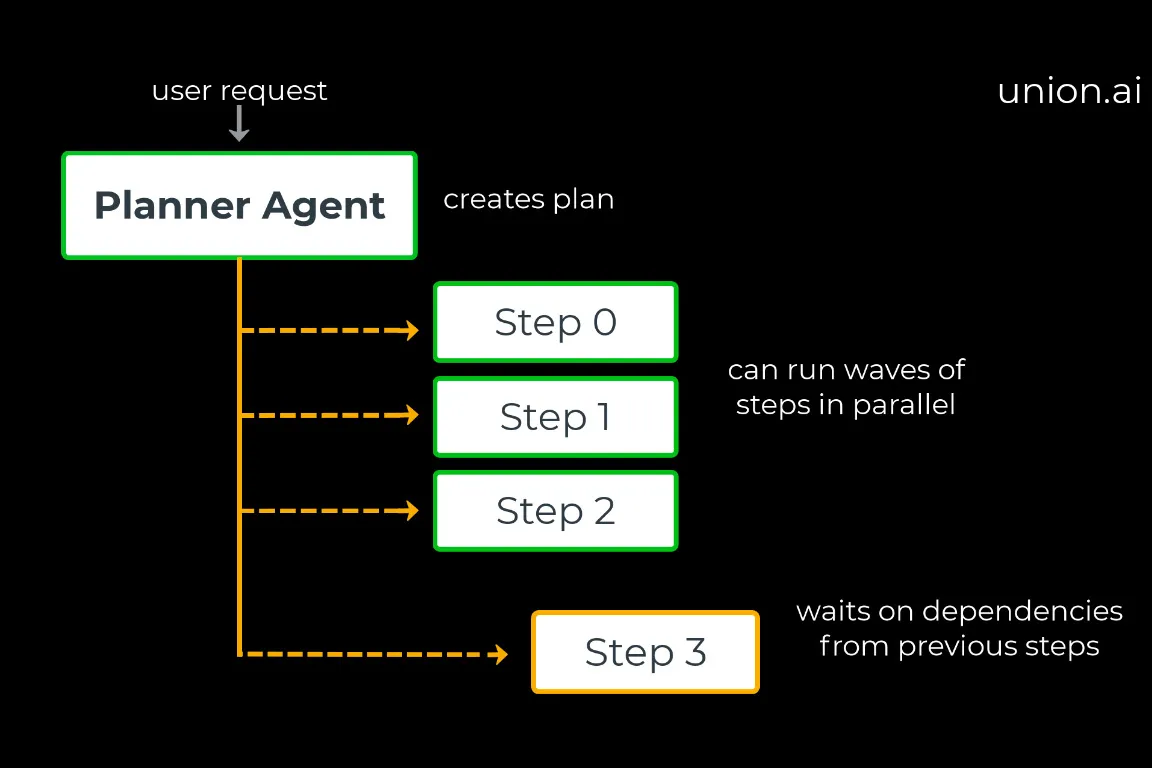
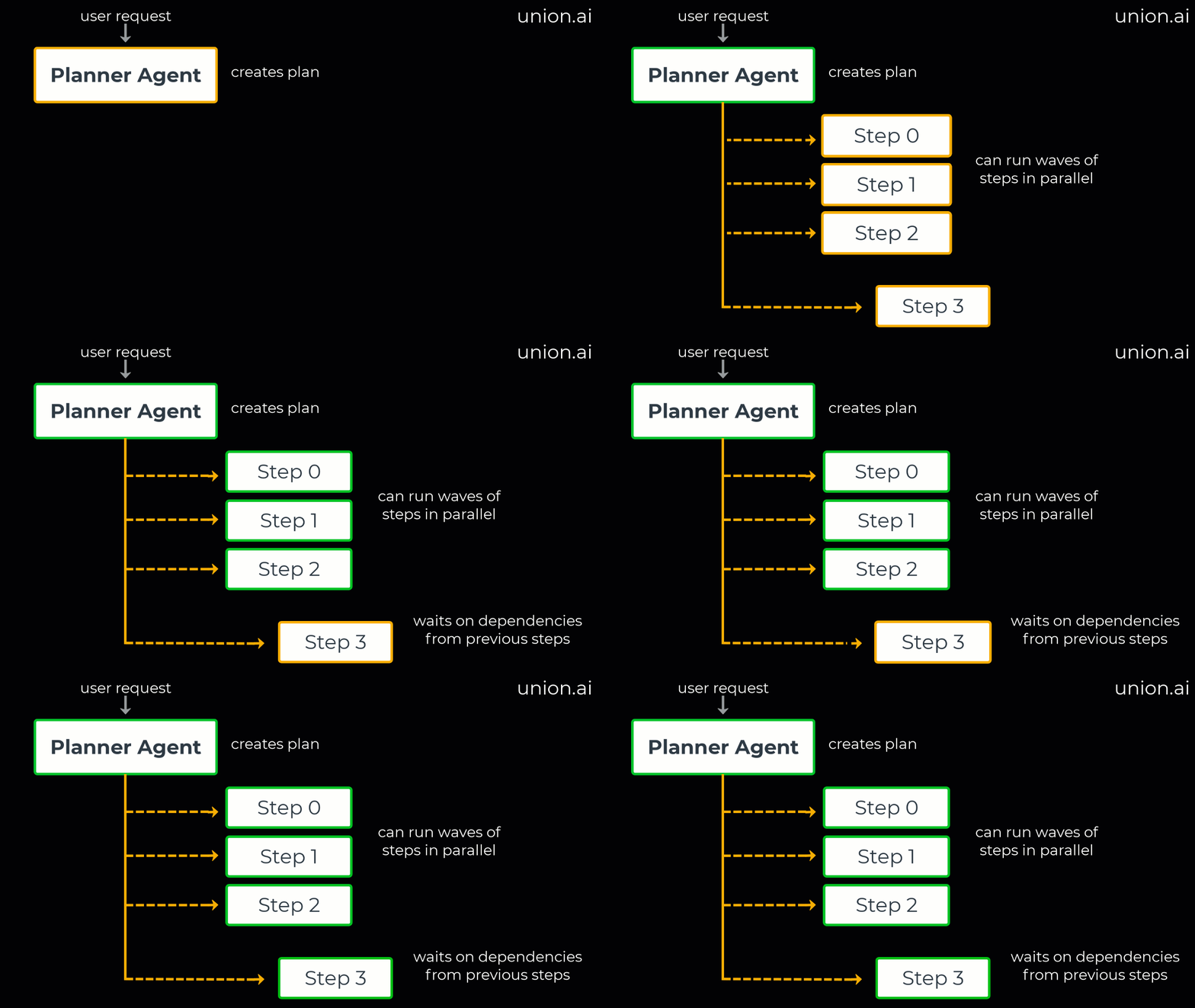
<figcaption>Planner Agent Flyte 2.0 execution graph for a multi-agent run (parallel wave + dependency wave)</figcaption>
Planner Agents: The fastest way to unlock parallel AI agent execution
What is a planner agent? As the name implies, a planner agent first generates a comprehensive workflow plan, including task dependencies (which tasks must complete before others can begin), before workflow execution starts.
What a planner agent does:
Goal interpretation: Understands the user's high-level request.
Task decomposition: Breaks the goal down into sequential and parallel steps.
Tool/agent routing: Selects the most appropriate specialist agent or tool for each step.
Context handling: Manages and passes necessary contextual information between agents (optional, based on system needs).
Dependency mapping: Identifies task dependencies to determine what can run in parallel.
Plan serialization: Creates a structured, executable workflow plan.
Executor: Executes the structured plan, orchestrating the agents and managing parallel execution.
Planner example (parallel wave & dependency wave)
Pros and cons of Planner Executor Agent based workflows
Pros
Speed: Parallelism is decided up front.
Auditable: You can inspect and validate the plan before execution.
Interpretable: The execution structure and logs are clearer.
Cons
Less Adaptive: If new information emerges after a step, the initial plan for the "best next step" might be incorrect.
Planner Fragility: Bad assumptions made early on can have a cascading negative effect.
💡 Note: You can combine planner agents with other types, such as ReAct or Reflection agents, by executing a portion of the planned tasks and reflecting on the results. This approach offers some parallelism while maintaining adaptability. We'll explore this in future tutorials!
Why AI Engineers switch from “one agent” to multi-agent orchestration
There are several reasons to consider switching from a single agent to multi-agent systems:
Task decomposability: Complex tasks can be broken down into smaller, manageable sub-tasks.
Parallel execution: An agent can search and parse results while another performs calculations or runs code.
Independent scaling: You can scale specific functions by having, for example, 10 web-search agents, 2 math agents, and 1 code agent.
Agent independence: Each agent can have a highly specialized and focused prompt, and changes are less likely to affect behavior of parent or other sub agents.
Durability: Retries, fault recovery, and resumable workflows become easier to implement.
Reliability: As the list of available tools grows, calling the appropriate tool can become challenging. Tying specialized tools to a focused agent increases the reliability of tool use.
It often makes sense to break tasks down into separate agents. It’s easier to recover from errors and expand the AI agent system capabilities over time.
Flyte 2.0 is built for exactly this: it treats “agent steps” like first-class workflow tasks, providing the platform features you’d normally need more“glue code” to replicate.
What is Flyte 2.0 multi-agent orchestration?
Flyte is an AI orchestration platform used by thousands of teams for their AI pipelines either with Flyte OSS or Union.ai, the enterprise Flyte platform. You've likely interacted with models trained or deployed using Flyte, whether on social media, music streaming, or self-driving cars! Flyte 2.0 introduces long-awaited features, including more dynamic options for use in AI Agents.
We’ll use Flyte 2.0 for multi-agent orchestration, which involves running multiple specialized AI agents (combining tools and reasoning) as durable, observable, and scalable workflow tasks. Flyte automatically manages parallel execution, agent observability, containers, retries, and resource isolation through an easy to use SDK, making it one of the best production AI Agent platforms available.
Project Structure: Planner Agent, Specialist Agents, and Tools
This tutorial's project architecture is built without using an external agent framework. We’ll be implementing the planner executor loop from scratch. You can, however, use Flyte with any agent framework you like (LangGraph, CrewAI, etc). You can just add the Flyte tasks and trace decorators to framework agents and tool definitions.
Each agent is a Flyte task: containerized, independently scalable, observable, and allocated resources.
Dataclass outputs: provides type-safe, serializable, and clean contracts between agents.
Async functions: enables concurrency and efficient I/O.
Reusable containers (ReusePolicy): allows for low-latency "warm" agent execution in Flyte, speeding up the overall process. This is available through Union.ai, the enterprise Flyte platform.
<figcaption>Find the full code on GitHub or run in Colab</figcaption>
Agent Environment setup
We’re going to set up our project to run on Flyte 2.0 which gives us all the scaling and durability we need for running AI agents in production.
💡 Note:If you don’t have access to a Flyte cluster you’ll still be able to follow along and run this agent locally on your machine. In fact, switching between local and remote runs is common practice when developing on Flyte to speed up interaction and debugging!
Clone agent workflow repo + install dependencies
This planner agent example is in the multi-agent-workflows tutorial folder. It also contains other agentic design patterns like ReAct and reflection agents you can also check out.
Copied to clipboard!
git clone https://github.com/unionai/workshops
cd workshops/tutorials/multi-agent-workflows
Create a Python environment (3.11+) and Install dependencies. UV is recommended, but you can use your preferred python environment manager.
<figcaption>Find the full code on GitHub or run in </figcaption>
Flyte Config (for remote runs)
You can skip this step if you plan on just running this locally without the remote connection to a Flyte cluster or platform, but you’ll miss out on some of the durable, scalable, and observable part of running on a remote Flyte cluster.
<figcaption>Find the full code on GitHub or run in Colab</figcaption>
💡 Note: `--auth-type headless` is only needed for headless environments. You can remove that line if you’re running this directly on your local machine.
This will generate a config file under `.flyte/config.yaml` by default that you can update later if you want to change things like domains, projects, or endpoints.
For this tutorial we’ll use OpenAI, but besides setting up the OpenAI client, the project is LLM agnostic, so you could swap out OpenAI with Anthropic, Hugging Face, self-hosted models, etc. You can even experiment swapping them out in individual specialized agents!
Setting local environment variables (Secrets)
Local development allows us to iterate and debug locally before deploying or scaling on remote runs.
Add .env file locally to the root of the project(workshops/tutorials/multi-agent-workflows) or set environment variable from your terminal.
Copied to clipboard!
# .env
OPENAI_API_KEY=sk-your-key-here
<figcaption>Find the full code on GitHub or run in Colab</figcaption>
Setting Flyte environment variables (Secrets)
Flyte secrets enable you to securely store and manage sensitive information, such as API keys, passwords, and other credentials. Secrets are stored on the data plane of your Union/Flyte backend. You can create, list, and delete secrets in the store using the Flyte CLI or SDK. Secrets in the store can be accessed and used within your workflow tasks, without exposing any cleartext values in your code.
Again, you can skip this step if you plan on just running this locally without the remote connection to a Flyte.
Run `flyte create secret YOUR_SECRET_NAME` and enter your API key as the requested input.
Copied to clipboard!
#terminal
flyte create secret OPENAI_API_KEY
<figcaption>Find the full code on GitHub or run in</figcaption>
Every agent in this example runs as a Flyte task, and tasks start with a Task Environment (image + secrets + resources). The ReusePolicy is the “secret sauce” for snappy multi-agent systems: it helps keep agent containers warm, so repeated calls don’t feel like starting a new serverless function every time. We also load our API keys from the secrets stored in Flyte.
We’ll start by sharing this environment across agents, but we can create new individual environments for any agents as needed. For example if we wanted an isolated environment for code agents, keep API keys scoped to specific agents, or need more resources for running an agentic task, like a GPU for a specialized SLM.
The first time we run our agent Flyte on Union.ai will check to see if the image exists or not. If not it will build the image before starting the agent run.
Copied to clipboard!
# config.py
import os
from pathlib import Path
from dotenv import load_dotenv
import flyte

# Load .env from the same directory as this file
env_path = Path(__file__).parent / '.env'
load_dotenv(dotenv_path=env_path)

# ----------------------------------
# Base Task Environment
# ----------------------------------
base_env = flyte.TaskEnvironment(
    name="base_env",
    image=flyte.Image.from_debian_base().with_requirements("requirements.txt"),
    secrets=[
        flyte.Secret(key="OPENAI_API_KEY", as_env_var="OPENAI_API_KEY"),
    ],
    resources=flyte.Resources(cpu=2, memory="2Gi"),
    reusable=flyte.ReusePolicy(
        replicas=2,
        idle_ttl=60,
        concurrency=10,
        scaledown_ttl=60,
    ),
)

# ----------------------------------
# Local API Keys
# ----------------------------------
OPENAI_API_KEY = os.getenv("OPENAI_API_KEY")
<figcaption>Find the full code on GitHub or run in Colab</figcaption>
A TaskEnvironment defines the hardware and software environment where your tasks run. Think of it as the container configuration for your code that Union.ai can build automatically at runtime.
Lightweight decorators to register agents and tools
Because we are developing these agents without using a specific agent framework, creating just two Python decorators can add a lot of convenience. These decorators will be added agent and tool functions, offering beneficial "agentic syntax" without requiring a full commitment to an existing agent framework.
This allows us to automatically read in a list of available agents and tools as we create them without having to hard code a list across different agent prompts, patterns or workflows. Basically, we’re creating a very minimal agent framework in just several lines of code!
Copied to clipboard!
# utils/decorators.py
agent_tools = {}
agent_registry = {}

def agent(name):
    """
    Register an agent for use in workflows.

    Args:
        name (str): The name of the agent (e.g., "math", "string")

    Example:
        @agent(name="math")
        async def math_agent(input):
            return eval(input)
    """
    def decorator(fn):
        agent_registry[name] = fn
        return fn
    return decorator

def tool(agent):
    """
    Register a tool for a specific agent.

    Args:
        agent (str): The agent this tool belongs to (e.g., "math", "string")

    Example:
        @tool(agent="math")
        async def add(a, b):
            return a + b
    """
    def decorator(fn):
        name = fn.__name__
        agent_tools.setdefault(agent, {})[name] = fn
        return fn
    return decorator
<figcaption>Find the full code on GitHub or run in Colab</figcaption>
Execute an LLM-generated tool plan (with JSON parsing)
The plan_executor.py module is the runtime engine that turns an LLM-generated tool calling plan into actual tool calls. When an agent receives a task, its LLM responds with a JSON array of steps, each specifying a tool name, arguments, and reasoning.
The plan executor first parses that response, gracefully handling cases where the JSON is wrapped in markdown code blocks or embedded in surrounding text. It then executes each step sequentially, looking up the appropriate tool function from a registry of agent-specific toolsets populated by the @agent_tools decorator.
A key feature is the "previous" keyword: if any argument in a step is the string "previous", it gets replaced with the result of the preceding step, enabling simple data-flow chaining between tools without the LLM needing to know intermediate values at planning time. Every step is logged for traceability, and the executor returns both the final result and a full step-by-step execution record.
💡 Note: Depending on your LLM API or model you can also use built-in structured outputs or tools like BAML to make outputs more reliable. We’ll stick with our basic JSON parsing for this example to make it model and API agnostic for now.
Copied to clipboard!
# utils/plan_executor.py
import json
import asyncio
import re
from utils.logger import Logger
from utils.decorators import agent_tools

# ----------------------------------
# Logger Configuration
# ----------------------------------

# Default logger; workflows can override via set_logger() to consolidate traces
_logger = None

def set_logger(logger: Logger):
    """Set the logger instance for plan execution traces. Call this from your workflow to consolidate all traces into one file."""
    global _logger
    _logger = logger

def _get_logger():
    global _logger
    if _logger is None:
        _logger = Logger(path="plan_executor_trace_log.jsonl")
    return _logger


# ----------------------------------
# Plan Parsing
# Extracts JSON tool plans from LLM responses,
# handling markdown code blocks and raw JSON
# ----------------------------------

def parse_plan_from_response(raw_plan: str) -> list:
    """
    Parse a tool execution plan from LLM response.
    Handles both clean JSON and responses wrapped in markdown code blocks.

    Args:
        raw_plan: Raw text response from LLM

    Returns:
        list: Parsed plan as list of tool call dictionaries

    Raises:
        ValueError: If plan cannot be parsed
    """
    # Try to parse directly first
    try:
        return json.loads(raw_plan)
    except json.JSONDecodeError as e:
        # If that fails, try to extract JSON from markdown code blocks or surrounding text
        print(f"[WARN] Direct JSON parse failed: {e}")
        print(f"[WARN] Attempting to extract JSON from response...")

        # Try to find JSON within markdown code blocks first
        code_block_match = re.search(r'```(?:json)?\s*(\[.*?\])\s*```', raw_plan, re.DOTALL)
        if code_block_match:
            try:
                plan = json.loads(code_block_match.group(1))
                print("[INFO] Successfully extracted JSON from markdown code block")
                return plan
            except json.JSONDecodeError:
                pass

        # If no code block, try to find any JSON array in the text
        json_match = re.search(r'\[(?:[^\[\]]*|\{[^}]*\})*\]', raw_plan, re.DOTALL)
        if json_match:
            try:
                plan = json.loads(json_match.group(0))
                print("[INFO] Successfully extracted JSON array from text")
                return plan
            except json.JSONDecodeError as e2:
                print(f"[ERROR] Extracted text is not valid JSON: {e2}")
                print(f"[ERROR] Extracted text:\n{json_match.group(0)}")
                print(f"[ERROR] Full LLM response:\n{raw_plan}")
                raise ValueError(f"Could not extract valid JSON array from LLM response")
        else:
            print(f"[ERROR] Could not find JSON array pattern in LLM response:\n{raw_plan}")
            raise ValueError(f"Could not extract valid JSON array from LLM response")


# ----------------------------------
# Tool Plan Execution
# Runs tool calls sequentially, passing results
# between steps via the "previous" keyword
# ----------------------------------

async def execute_tool_plan(plan: list, agent: str) -> dict:
    """
    Execute a plan by calling tools in sequence.
    This is the core execution logic - agents call their LLM to get the plan,
    then pass it here for execution.

    Args:
        plan: List of tool calls [{"tool": "name", "args": [...], "reasoning": "..."}]
        agent: Which agent's toolset to use

    Returns:
        dict: {"final_result": ..., "steps": [...]} or {"error": ..., "steps": [...]}
    """
    toolset = agent_tools.get(agent)
    if not toolset:
        available = list(agent_tools.keys())
        raise ValueError(
            f"No tools registered for agent '{agent}'. "
            f"Available agents with tools: {available}. "
            f"Did you import the tools file?"
        )

    steps_log = []
    last_result = None

    #----------------------------------
    # Execute the plan
    #----------------------------------
    try:
        for step in plan:
            tool_name = step["tool"]
            args = step["args"]
            reasoning = step.get("reasoning", "")
            # Replace "previous" keyword with result from last tool call (enables chaining)
            args = [last_result if str(a).lower() == "previous" else a for a in args]

            if tool_name in toolset:
                # Tools are now async, so we need to await them
                tool_func = toolset[tool_name]
                if asyncio.iscoroutinefunction(tool_func):
                    result = await tool_func(*args)
                else:
                    result = tool_func(*args)
            else:
                await _get_logger().log(tool=tool_name, args=args, error="Unknown tool", reasoning=reasoning)
                raise ValueError(f"Unknown tool: {tool_name}")

            await _get_logger().log(tool=tool_name, args=args, result=result, reasoning=reasoning)
            steps_log.append({"tool": tool_name, "args": args, "result": result, "reasoning": reasoning})
            last_result = result

        return {"final_result": last_result, "steps": steps_log}

    except Exception as e:
        await _get_logger().log(tool=tool_name if "tool_name" in locals() else "unknown", args=args if "args" in locals() else [], error=str(e))
        return {"error": str(e), "steps": steps_log}
<figcaption>Find the full code on GitHub or run in Colab</figcaption>
Logging for local debugging
The Logger provides two complementary logging utilities for the multi-agent system. The setup_logging() function configures Python's standard logging with sensible defaults, suppressing noisy third-party libraries while keeping your workflow logs visible. The Logger class handles structured trace logging, writing JSON lines to files in the traces/ directory when running the agents locally. Each log entry is timestamped and can capture arbitrary key-value data (tool calls, results, errors, reasoning steps).
This makes it easy to replay and debug agent behavior after the fact. Workflows create their own Logger instance with a custom filename, giving each workflow its own trace file for analysis.
Copied to clipboard!
# utils/logger.py

import json
import logging
import os
from datetime import datetime

TRACES_DIR = os.path.join(os.path.dirname(__file__), "..", "traces")


def setup_logging(name: str) -> logging.Logger:
    """Set up logging with noisy library suppression. Returns a logger for the calling module."""
    logging.basicConfig(level=logging.WARNING, format="%(message)s", force=True)
    logger = logging.getLogger(name)
    logger.setLevel(logging.INFO)
    return logger


class Logger:
    def __init__(self, path="trace_log.jsonl", verbose=False):
        os.makedirs(TRACES_DIR, exist_ok=True)
        self.path = os.path.join(TRACES_DIR, path)
        self.verbose = verbose

    async def log(self, **kwargs):
        kwargs["timestamp"] = datetime.utcnow().isoformat()
        if self.verbose:
            print("[LOG]", kwargs)
        with open(self.path, "a") as f:
            f.write(json.dumps(kwargs) + "\n")
<figcaption>Find the full code on GitHub or run in Colab</figcaption>
Agent Tools
Tools are the “hands” of your agents. We’ll keep them small and composable.
💡 Note: `@flyte.trace` is how you turn tool calls into something you can actually debug in the platform. It will log the inputs and outputs just like a Flyte task.
Tools are essentially functions that do something, this could be running a block of code, calling and API, or generating code.
Each tool is decorated with the @tools() decorated we created earlier with the Agent it belongs to, and the @flyte.trace() decorated.
You can easily expand your agent tools:
Copied to clipboard!
# tools/math_tools.py
from utils.decorators import tool
import flyte
from typing import Union

# Type alias for numeric inputs - LLMs might pass strings, ints, or floats
Numeric = Union[int, float, str]


@tool(agent="math")
@flyte.trace
async def add(a: Numeric, b: Numeric) -> float:
    """
    Adds two numbers together.

    Args:
        a: The first number (can be int, float, or numeric string).
        b: The second number (can be int, float, or numeric string).

    Returns:
        float: The sum of the two numbers.
    """
    a_val = float(a)
    b_val = float(b)
    print(f"[Math Tool] Adding {a_val} + {b_val}")
    return a_val + b_val


@tool(agent="math")
@flyte.trace
async def multiply(a: Numeric, b: Numeric) -> float:
    """
    Multiplies two numbers.

    Args:
        a: The first number (can be int, float, or numeric string).
        b: The second number (can be int, float, or numeric string).

    Returns:
        float: The product of the two numbers.
    """
    a_val = float(a)
    b_val = float(b)
    print(f"[Math Tool] Multiplying {a_val} * {b_val}")
    return a_val * b_val


@tool(agent="math")
@flyte.trace
async def power(a: Numeric, b: Numeric) -> float:
    """
    Raises a number to the power of another number.

    Args:
        a: The base number (can be int, float, or numeric string).
        b: The exponent (can be int, float, or numeric string).

    Returns:
        float: The result of raising the base to the given exponent.
    """
    a_val = float(a)
    b_val = float(b)
    print(f"[Math Tool] Calculating {a_val} ** {b_val}")
    return a_val ** b_val
<figcaption>Find the full code on GitHub or run in Colab</figcaption>
Let's also take a look at the weather tool, which calls an API instead of just running a Python function. It follows the same basic structure of an async python function with the tool and Flyte trace decorators.
Copied to clipboard!
import httpx
import flyte
from utils.decorators import tool

@tool(agent="weather")
@flyte.trace
async def get_weather(location: str) -> dict[str, str]:
    """
    Gets the current weather for a given location using the wttr.in API.

    Args:
        location (str): The location to get weather for (e.g., "London", "New York", "Tokyo")

    Returns:
        dict: Weather information including temperature, condition, and description
    """
    print(f"TOOL CALL: Getting weather for {location}")

    async with httpx.AsyncClient() as client:
        # Call wttr.in API with JSON format
        response = await client.get(
            f"https://wttr.in/{location}?format=j1",
            timeout=10.0
        )
        response.raise_for_status()
        data = response.json()

    # Extract key weather information
    current = data['current_condition'][0]
    weather_info = {
        "location": location,
        "temperature_c": current['temp_C'],
        "temperature_f": current['temp_F'],
        "condition": current['weatherDesc'][0]['value'],
        "feels_like_c": current['FeelsLikeC'],
        "feels_like_f": current['FeelsLikeF'],
        "humidity": current['humidity'],
        "wind_speed_kmph": current['windspeedKmph']
    }

    return weather_info
<figcaption>Find the full code on GitHub or run in Colab</figcaption>
Take a look in the /tools directory for more examples of different tools types.
A specialist agent as a Flyte task
This specialized agent architecture, shown here by looking at the Math Agent, follows a standard, repeatable design for the rest of system agents:
Core Pattern: Separation of Planning and Execution
An agent receives a task(from planner agent) and uses an LLM to generate a tool execution plan.
The actual tool calling is then delegated to the plan executor utility.
In this case the agent's role is to reason about which tools to call not to perform the task itself (e.g., the Math Agent doesn't do the math).
This separation enhances composability and debuggability.
Key Architectural Features
Configurability: Agent configuration (prompt, environment, model, temperature, max tokens) is easily tunable and defined at the module level.
Structured Output: A dataclass clearly defines the expected return type, ensuring downstream workflows know what to expect.
Prompt Engineering: The system prompt includes a carefully crafted structure and a one-shot example to steer the LLM toward producing valid JSON tool calls.
Each agent is an async function that’s decorated with an agent and Flyte end.tast decorator.
This pattern can be copied to create new agents, expanding the system's overall capabilities.
Copied to clipboard!
# agents/math_agent.py
"""
This module defines the math_agent, which is responsible for solving arithmetic, powers, and multi-step problems.
"""

import json
import flyte
from openai import AsyncOpenAI

# Import tools to register them
import tools.math_tools

from utils.decorators import agent, agent_tools
from utils.plan_executor import execute_tool_plan, parse_plan_from_response
from dataclasses import dataclass
from config import base_env, OPENAI_API_KEY

# ----------------------------------
# Agent-Specific Configuration
# ----------------------------------
MATH_AGENT_CONFIG = {
    "model": "gpt-4o-mini",
    "temperature": 0.0,
    "max_tokens": 500,
}

# ----------------------------------
# Data Models
# ----------------------------------

@dataclass
class MathAgentResult:
    """Result from math agent execution"""
    final_result: str
    steps: str  # JSON string of steps taken
    error: str = ""  # Empty if no error


# ----------------------------------
# Math Agent Task Environment
# ----------------------------------
env = base_env
#If you need agent-specific dependencies, create a separate environments:
# env = flyte.TaskEnvironment(
#     name="code_agent_env",
#     image=base_env.image.with_pip_packages(["numpy", "pandas"]),
#     secrets=base_env.secrets,
#     resources=flyte.Resources(cpu=2, mem="4Gi")
# )


@agent("math")
@env.task
async def math_agent(task: str) -> MathAgentResult:
    """
    Math agent that processes user prompts to solve arithmetic and multi-step problems.

    Args:
        task (str): The math task to solve.

    Returns:
        MathAgentResult: The result of the computation and the steps taken.
    """
    print(f"[Math Agent] Processing: {task}")

    # Initialize client inside task for Flyte secret injection
    client = AsyncOpenAI(api_key=OPENAI_API_KEY)

    # Build system message with available tools
    toolset = agent_tools["math"]
    tool_list = "\n".join([f"{name}: {fn.__doc__.strip()}" for name, fn in toolset.items()])
    system_msg = f"""
        You are a math agent that can solve arithmetic, powers, and multi-step problems.

        Tools:
        {tool_list}

        CRITICAL: You must respond with ONLY a valid JSON array, nothing else. No markdown, no explanations.
        Return a JSON array of tool calls in this exact format:
        [
        {{"tool": "add", "args": [2, 3], "reasoning": "Adding 2 and 3 to compute the sum."}},
        {{"tool": "multiply", "args": ["previous", 5], "reasoning": "Multiplying previous result by 5."}}
        ]

        RULES:
        1. Start your response with [ and end with ]
        2. No markdown code blocks (no ```)
        3. No extra text before or after the JSON
        4. Always include a "reasoning" field for each step
        5. Use "previous" in args to reference the previous step result
        """

    # Call LLM to create plan using agent-specific config
    response = await client.chat.completions.create(
        model=MATH_AGENT_CONFIG["model"],
        temperature=MATH_AGENT_CONFIG["temperature"],
        max_tokens=MATH_AGENT_CONFIG["max_tokens"],
        messages=[
            {"role": "system", "content": system_msg},
            {"role": "user", "content": "Add 2 and 3"},
            {"role": "assistant", "content": '[{"tool": "add", "args": [2, 3], "reasoning": "Adding 2 and 3"}]'},
            {"role": "user", "content": task}
        ]
    )

    # Parse and execute the plan
    raw_plan = response.choices[0].message.content
    plan = parse_plan_from_response(raw_plan)
    result = await execute_tool_plan(plan, agent="math")

    print(f"[Math Agent] Result: {result}")

    return MathAgentResult(
        final_result=str(result.get("final_result", "")),
        steps=json.dumps(result.get("steps", [])),
        error=result.get("error", "")
    )
<figcaption>Find the full code on GitHub or run in Colab</figcaption>
Look at the other agent example in the /agent directory.
The Planner Agent: generating a dependency-aware execution plan
The Planner Agent functions as the primary orchestrator, responsible for breaking down complex user requests into a series of executable steps. Unlike specialized agents that directly utilize tools, the Planner's role is to determine which specialist agents to invoke and in what order.
It achieves this by:
Inspecting the Agent Registry: Discovering all available specialist agents.
Prompting the LLM: Generating a structured plan, which is a sequence of steps.
This structured plan details the necessary tasks, the specific agent assigned to each task, and the dependencies between steps (expressed as indices). This dependency system supports both sequential and parallel execution patterns.
This two-tiered architecture with the Planner deciding the strategy ("who does what") and the specialists handling the execution ("how to do it and which tools to use"). You can think of it as teamwork where a coordinator delegates tasks to experts (e.g., math or weather agents).
The Planner itself does not perform any execution; it produces a `PlannerDecision` object that is then consumed and acted upon by workflows, such as the planner executor workflow (shown next).
Copied to clipboard!
#agents/planner
"""
This module defines the planner_agent, which routes requests to appropriate specialist agents.
"""

import json
import flyte
from openai import AsyncOpenAI
from dataclasses import dataclass
from typing import List

from config import OPENAI_API_KEY
from utils.decorators import agent, agent_registry
from config import base_env

import agents.math_agent
import agents.string_agent
import agents.web_search_agent
import agents.code_agent
import agents.weather_agent

# ----------------------------------
# Data Models
# ----------------------------------

@dataclass
class AgentStep:
    """Single step in the execution plan"""
    agent: str
    task: str
    dependencies: List[int] = None  # List of step indices this step depends on (0-indexed)

    def __post_init__(self):
        # Default to empty list if None
        if self.dependencies is None:
            self.dependencies = []


@dataclass
class PlannerDecision:
    """Decision from planner agent - can contain multiple steps"""
    steps: List[AgentStep]


# ----------------------------------
# Planner Agent Task Environment
# ----------------------------------
env = base_env
# If you need agent-specific dependencies, create separate environments:
# env = flyte.TaskEnvironment(
#     name="code_agent_env",
#     image=base_env.image.with_pip_packages(["numpy", "pandas"]),
#     secrets=base_env.secrets,
#     resources=flyte.Resources(cpu=2, mem="4Gi")
# )


@agent("planner")
@env.task
async def planner_agent(user_request: str) -> PlannerDecision:
    """
    Planner agent that analyzes requests and creates execution plans.

    Args:
        user_request (str): The user's request to analyze and route.

    Returns:
        PlannerDecision: Plan with one or more agent steps.
    """
    print(f"[Planner Agent] Processing request: {user_request}")

    # Initialize client inside task for Flyte secret injection
    client = AsyncOpenAI(api_key=OPENAI_API_KEY)

    available_agents = [a for a in agent_registry if a != "planner"]
    agent_list = "\n".join([f"- {a}" for a in available_agents])

    system_msg = f"""
        You are a routing agent.
        Available agents:
        {agent_list}

        Analyze the user's request and decide which agent(s) to use.

        DEPENDENCIES: Use 'dependencies' to specify which steps must complete before this step.
        - dependencies is a list of step indices (0-indexed)
        - Empty list [] means the step can run immediately (no dependencies)
        - Steps with no dependencies can run in PARALLEL
        - Steps with dependencies will wait for those steps to complete and receive their results

        IMPORTANT: When a step depends on previous steps, the results will be automatically
        provided in the prompt. Write clear task descriptions that reference what to do with those results.

        Examples:

        INDEPENDENT TASKS (can run in parallel):
        {{"steps": [
        {{"agent": "math", "task": "Calculate 5 factorial", "dependencies": []}},
        {{"agent": "string", "task": "Count words in 'Hello World'", "dependencies": []}},
        {{"agent": "web_search", "task": "Search for Python tutorials", "dependencies": []}}
        ]}}

        DEPENDENT TASKS (step 1 uses result from step 0):
        {{"steps": [
        {{"agent": "math", "task": "Calculate 5 times 3", "dependencies": []}},
        {{"agent": "math", "task": "Add 10 to the result from step 0", "dependencies": [0]}}
        ]}}

        CROSS-AGENT DEPENDENCIES (web search then math):
        {{"steps": [
        {{"agent": "web_search", "task": "Search for USA GDP in 2023", "dependencies": []}},
        {{"agent": "math", "task": "Calculate 10% of the GDP value from step 0", "dependencies": [0]}}
        ]}}

        MULTIPLE DEPENDENCIES (step 2 waits for both 0 and 1):
        {{"steps": [
        {{"agent": "math", "task": "Calculate 5 factorial", "dependencies": []}},
        {{"agent": "string", "task": "Count letters in 'test'", "dependencies": []}},
        {{"agent": "code", "task": "Multiply the factorial from step 0 by the letter count from step 1", "dependencies": [0, 1]}}
        ]}}

        IMPORTANT: Always include 'dependencies' field for each step, even if empty [].
"""

    res = await client.chat.completions.create(
        model="gpt-4",
        messages=[
            {"role": "system", "content": system_msg},
            {"role": "user", "content": user_request}
        ]
    )

    result = json.loads(res.choices[0].message.content)
    print(f"[Planner Agent] Raw result: {result}")

    # Convert to dataclass
    steps = [
        AgentStep(
            agent=step["agent"],
            task=step["task"],
            dependencies=step.get("dependencies", [])
        )
        for step in result["steps"]
    ]

    print(f"[Planner Agent] Plan has {len(steps)} step(s)")
    for i, step in enumerate(steps):
        deps_str = f" → depends on steps {step.dependencies}" if step.dependencies else " → independent (can run in parallel)"
        print(f"[Planner Agent]   Step {i}: [{step.agent}] {step.task}{deps_str}")

    return PlannerDecision(steps=steps)
<figcaption><figcaption>Find the full code on GitHub or run in Colab</figcaption>
The planner Agent workflow: dependency-aware parallel agent orchestration
This is where Flyte 2.0 multi-agent orchestration really shines. You treat agents as tasks, then run them in waves based on dependencies.
Dynamic orchestrator workflow (parallel waves)
💡 Note: this is essentially a control statement looking for what agent to run in the generated plan, so you can easily example your multi agent system by adding new agents and tools!
Copied to clipboard!
# workflows/planner.py
"""
Dynamic workflow example using the planner agent for intelligent task routing.
This workflow demonstrates how the planner can dynamically choose which agent to use for different tasks.

Each agent (planner, math, string) is now a standalone Flyte task with its own TaskEnvironment,
allowing independent scaling, resource allocation, and container configuration.
"""

from typing import List, Dict
from dataclasses import dataclass
import flyte
import asyncio

from agents import import_all_agents
from agents.planner_agent import planner_agent, AgentStep
import_all_agents()

from config import base_env
from utils.logger import Logger, setup_logging
from utils.decorators import agent_registry
from utils.plan_executor import set_logger

trace_logger = Logger(path="planner_trace_log.jsonl", verbose=False)
set_logger(trace_logger)
log = setup_logging(__name__)

# ----------------------------------
# Helper Functions
# ----------------------------------

def build_task_with_context(
    task: str,
    dependencies: List[int],
    completed_results: Dict
) -> str:
    """
    Build a task prompt with context from dependent steps.

    This is how results flow between agents: when a step depends on previous steps,
    we prepend their results to the task prompt so the agent has the context it needs.

    Args:
        task: The original task description from the planner
        dependencies: List of step indices this task depends on
        completed_results: Dictionary of completed step results

    Returns:
        If no dependencies: returns task unchanged
        If has dependencies: returns task with context section prepended

    Example output:
        ============================================================
        RESULTS FROM PREVIOUS STEPS:
        ============================================================
          - Step 0 (web_search agent): France's GDP is €2.6 trillion
        ============================================================

        YOUR TASK:
        Calculate 5% of the GDP from step 0
    """
    if not dependencies:
        return task

    # Build context section with results from dependent steps
    context_lines = [
        f"  - Step {dep_idx} ({completed_results[dep_idx].agent} agent): {completed_results[dep_idx].result_summary}"
        for dep_idx in dependencies
    ]

    # Format with clear visual separators
    context_header = "=" * 60 + "\nRESULTS FROM PREVIOUS STEPS:\n" + "=" * 60
    context_footer = "=" * 60

    return (
        f"{context_header}\n"
        f"{chr(10).join(context_lines)}\n"
        f"{context_footer}\n\n"
        f"YOUR TASK:\n{task}"
    )

# ----------------------------------
# Data Models for Orchestrator
# ----------------------------------

@dataclass
class AgentExecution:
    """Single agent execution with its result"""
    agent: str
    task: str
    result_summary: str
    result_full: str
    error: str = ""


@dataclass
class TaskResult:
    """Final result from dynamic task execution"""
    planner_decision_summary: str
    agent_executions: List[AgentExecution]
    final_result: str


# ----------------------------------
# Orchestrator Task Environment
# ----------------------------------
env = base_env
# env = flyte.TaskEnvironment(
#     name="orchestrator_env",
#     image=flyte.Image.from_debian_base().with_requirements("requirements.txt"),
#     secrets=[
#         flyte.Secret(key="OPENAI_API_KEY", as_env_var="OPENAI_API_KEY"),
#     ],
# )


# ----------------------------------
# Main Orchestration Task
# ----------------------------------

@env.task
async def planner_agent_workflow(user_request: str) -> TaskResult:
    """
    Planner-based multi-agent workflow with dynamic routing and parallel execution.

    This workflow uses a planner agent to analyze the request and create an execution
    plan with dependencies, then orchestrates specialist agents accordingly. Steps
    with no dependencies run in parallel (fanout pattern).

    Args:
        user_request: The user's request to fulfill

    Returns:
        TaskResult: Combined result from all agent executions
    """
    log.info(f"[Orchestrator] User request: {user_request}")

    # ----------------------------------
    # PHASE 1: Planning - Generate Execution Plan
    # ----------------------------------
    # Planner agent analyzes request and creates DAG (directed acyclic graph) of agent steps
    log.info("[Orchestrator] Step 1: Calling planner agent...")
    planner_decision = await planner_agent(user_request)
    log.info(f"[Orchestrator] Planner created plan with {len(planner_decision.steps)} step(s)")

    # ----------------------------------
    # PHASE 2: Execution - Dependency-Aware Parallel Orchestration
    # ----------------------------------
    # Execute steps in waves: all independent steps run in parallel, dependent steps wait

    # Store completed results indexed by step number (enables dependency lookup)
    completed_results: Dict[int, AgentExecution] = {}

    # Track which steps still need execution
    pending_steps = list(enumerate(planner_decision.steps))

    # ----------------------------------
    # Main Orchestration Loop
    # ----------------------------------
    # Continue until all steps complete or circular dependency detected
    while pending_steps:
        # ----------------------------------
        # Identify Ready Steps (Dependencies Satisfied)
        # ----------------------------------
        # Partition pending steps into: ready to execute vs waiting on dependencies
        ready_steps = []
        remaining_steps = []

        for step_idx, step in pending_steps:
            # Check if all dependencies are completed
            deps_satisfied = all(dep_idx in completed_results for dep_idx in step.dependencies)

            if deps_satisfied:
                ready_steps.append((step_idx, step))
            else:
                remaining_steps.append((step_idx, step))

        # Circular dependency detection
        if not ready_steps:
            log.error("[Orchestrator] ERROR: No steps ready to execute, but pending steps remain (circular dependency?)")
            break

        log.info(f"[Orchestrator] Executing {len(ready_steps)} step(s) in parallel...")

        # ----------------------------------
        # Parallel Step Execution
        # ----------------------------------
        # Define nested async function to execute a single step (enables parallel gather)
        async def execute_step(step_idx: int, step: AgentStep) -> tuple:
            """Execute a single agent step with context injection"""
            log.info(f"[Orchestrator]   Step {step_idx}: Calling {step.agent} agent...")
            log.info(f"[Orchestrator]     Task: {step.task}")

            # ----------------------------------
            # Context Injection - How Results Flow Between Agents
            # ----------------------------------
            # If this step depends on previous steps, inject their results into the task prompt
            # Example: "Step 0 result: 120\nStep 1 result: Factorial...\n\nYOUR TASK: Add these"
            task = build_task_with_context(step.task, step.dependencies, completed_results)

            if step.dependencies:
                log.info(f"[Orchestrator]     Context from steps {step.dependencies} added to task")

            # ----------------------------------
            # Dynamic Agent Routing
            # ----------------------------------
            # Look up agent function from registry (populated at import time via decorators)
            agent_func = agent_registry.get(step.agent)
            if not agent_func:
                # Unknown agent - the planner hallucinated or requested invalid agent
                log.warning(f"[Orchestrator] WARNING: Unknown agent '{step.agent}'")
                result_full = ""
                result_summary = ""
                error = f"Unknown agent: {step.agent}"
            else:
                # Execute the agent with the (potentially context-enriched) task
                agent_result = await agent_func(task)
                result_full = agent_result.final_result
                # Use summary field if available (e.g., web_search), otherwise use final_result
                result_summary = getattr(agent_result, 'summary', agent_result.final_result)
                error = agent_result.error

            log.info(f"[Orchestrator]   Step {step_idx} completed: {result_summary[:300]}...")

            # Persist execution details to log file for debugging and analysis
            await trace_logger.log(
                step_idx=step_idx,
                agent=step.agent,
                input_task=task,
                output_full=result_full,
                output_summary=result_summary,
                output_full_length=len(result_full),
                output_summary_length=len(result_summary),
                error=error,
                dependencies=step.dependencies
            )

            # Return tuple: (step_idx, execution_result) for results collection
            return step_idx, AgentExecution(
                agent=step.agent,
                task=step.task,
                result_summary=result_summary,
                result_full=result_full,
                error=error
            )

        # ----------------------------------
        # Execute All Ready Steps Concurrently
        # ----------------------------------
        # asyncio.gather runs all ready steps in parallel (fanout pattern)
        # This is where the speedup comes from: independent steps don't wait for each other
        results = await asyncio.gather(*[execute_step(idx, step) for idx, step in ready_steps])

        # ----------------------------------
        # Store Completed Results
        # ----------------------------------
        # Index by step number so dependent steps can look up results
        for step_idx, execution in results:
            completed_results[step_idx] = execution

        # Update pending steps list (remove completed, keep waiting)
        pending_steps = remaining_steps

    # ----------------------------------
    # PHASE 3: Results Collection and Synthesis
    # ----------------------------------

    # ----------------------------------
    # Reconstruct Execution Order
    # ----------------------------------
    # Convert dict back to list in original plan order for result presentation
    agent_executions = [completed_results[i] for i in range(len(planner_decision.steps))]

    # ----------------------------------
    # Aggregate Results from All Agents
    # ----------------------------------
    # Collect summaries from each step, handling errors gracefully
    final_results = []
    for execution in agent_executions:
        if execution.error:
            final_results.append(f"{execution.agent}: ERROR - {execution.error}")
        elif execution.result_summary:
            final_results.append(f"{execution.agent}: {execution.result_summary}")

    # Combine all agent outputs into single result string
    combined_result = " | ".join(final_results) if final_results else "No results"
    log.info(f"[Orchestrator] All agents completed. Combined result: {combined_result}")

    # Create human-readable summary of what was executed
    planner_summary = f"{len(planner_decision.steps)} step(s): " + ", ".join(
        [f"{s.agent}" for s in planner_decision.steps]
    )

    # ----------------------------------
    # Return Complete Execution Trace
    # ----------------------------------
    # Package plan summary, individual executions, and final result
    return TaskResult(
        planner_decision_summary=planner_summary,
        agent_executions=agent_executions,
        final_result=combined_result
    )


# ----------------------------------
# Local Execution Helper
# ----------------------------------

if __name__ == "__main__":
    import argparse

    # Parse command line arguments
    parser = argparse.ArgumentParser(
        description="Run Flyte dynamic workflow with intelligent agent routing",
        epilog="Example: python workflows/flyte_dynamic.py --local --request 'Calculate 5 factorial'"
    )
    parser.add_argument(
        "--local",
        action="store_true",
        help="Run workflow locally instead of remote execution"
    )
    parser.add_argument(
        "--request",
        type=str,
        default="Calculate 5 factorial",
        help="The task request to execute (see README.md for examples)"
    )
    parser.add_argument(
        "--get-output",
        type=str,
        nargs="?",
        const="latest",
        metavar="RUN_NAME",
        help="Fetch output from a run. Use without value for latest, or provide run name."
    )
    args = parser.parse_args()

    # Initialize Flyte based on local/remote flag
    if args.local:
        print("Running workflow LOCALLY with flyte.init()")
        flyte.init()
    else:
        print("Running workflow REMOTELY with flyte.init_from_config()")
        flyte.init_from_config(".flyte/config.yaml")

    # ----------------------------------
    # Fetch Latest Output Mode
    # ----------------------------------
    if args.get_output:
        from flyte.remote import Run

        if args.get_output == "latest":
            print("\n=== Fetching Latest Run Output ===\n")
            # Get latest run
            runs = list(Run.listall(
                sort_by=("created_at", "desc"),
                limit=1
            ))
            if not runs:
                print("No runs found")
                exit(1)
            run_name = runs[0].name
            print(f"Latest run: {run_name}")
        else:
            run_name = args.get_output
            print(f"\n=== Fetching Output for Run: {run_name} ===\n")

        run = Run.get(run_name)
        outputs = run.outputs()
        print(f"Result: {outputs.named_outputs}")
        print(f"{'='*60}\n")
    else:
        # ----------------------------------
        # Run New Execution Mode
        # ----------------------------------
        print(f"\n=== Planner Agent Workflow ===")
        print(f"Request: {args.request}\n")

        execution = flyte.run(
            planner_agent_workflow,
            user_request=args.request
        )

        print(f"\n{'='*60}")
        print(f"Execution: {execution.name}")
        print(f"URL: {execution.url}")
        print(f"{'='*60}\n")
<figcaption>Find the full code on GitHub or run in Colab</figcaption>
Running the planner agent
Try asking it complex tasks to see how it handles agent dependencies and parallelism! And experiment with questions that trigger different agents like search, code, weather, etc.
Run the agent locally.
Copied to clipboard!
python -m workflows.planner --request "Calculate 10 times 5 and count words in 'Hello World', then multiply the word count by the calculation result" --local
<figcaption>Find the full code on GitHub or run in Colab</figcaption>
Run the agent remotely on a Flyte cluster.
Copied to clipboard!
python -m workflows.planner --request "Calculate 10 times 5 and count words in 'Hello World', then multiply the word count by the calculation result"
<figcaption>Find the full code on GitHub or run in </figcaption>
💡 Note: In this example we’re running from the CLI using flyte.run(), but once we have a task register in Flyte we could kick off an run in different ways, like using a trigger or an interface from a hosted application!
Getting the results from Flyte (Remote SDK).
When our planner agent remotely it stores the output remotely as well. Lets pull the output from our latest run using the remote SDK. We already implemented this as an input flag in the above workflow, so we can run:
We could add an await to the run so the output would be rendered automatically after completion as well.
The Remote SDK basically allows you pull any info you see in the UI including I/O from each task, logs, details, and more. Check out remote SDK documentation for more details.
We saw how to build a planner based agent system that you can extend to with your own tools & agent!
Why Flyte 2.0 is especially good for AI agent systems
A lot of agent demos work… until you need to operate them.
How Flyte 2.0 solves agent pain
Durable execution: failures are isolated to steps; retries are step-scoped
Observable agent execution: dependencies + timing are visible, not guessed
Resource isolation: web search can be I/O-heavy; code gen may need more CPU; other agents may need GPUs later
Independent scaling: scale “web_search” replicas without scaling everything
Reusable containers: lower latency when agents run frequently
In other words: Flyte isn’t just “a place to run agents.” It’s the durable and scalable agent runtime to deploy them reliably.
Planner Agent FAQs
Is a planner agent the same as a ReAct agent?
No. Planner agents decide the whole plan up front (great for parallelism). ReAct agents interleave reasoning and acting step-by-step (great for adaptivity). Many production systems combine them: Planner executor + ReAct agents.
Can I use Flyte with LangGraph / CrewAI / other frameworks?
Yes. The key trick is: treat “agents” as Flyte tasks. Your framework can run inside tasks: Flyte handles orchestration, scaling, retries, observability, and durability. It should work with any Python Agent framework you’re building in. See more examples on GitHub.
What does Agent “durability” mean here?
If step 3 fails, you don’t lose the entire run. You can retry step 3, inspect logs, and keep prior results visible. The workflow is resilient because execution is checkpointed at task boundaries (outputs between tasks), not trapped in one long-running process.
Imagine spending quite a bit of time and tokens to come up with a complex plan only to have a failure occur on a tool call. This saves having to recompute the plan and rerun any other tasks between failures.
Flyte 2.0 also allows you to perform error handling that can overwrite infrastructure based on failure. For example, if you get an out of memory error (OOM) you can increase the memory in your task environment!
Retries docs
Error handling docs
Upgrade Considerations for the Planner Agent
I hope this tutorial served as a great starting point for building planner agents. We’re off to a great start for building production grade AI agents, but I wanted to leave you with some considerations outside of the scope for this tutorial:
Structured outputs: Use a stricter contract for planner output (e.g., a JSON schema / typed model) so plan parsing is deterministic. Prompting helps, but validation is your seatbelt.
Plan-level validation: Before executing, validate plan can run:
tools exist
arguments are the right types
dependency graph is acyclic
max parallelism limits
Conclusion: Flyte 2.0 multi-agent orchestration is how you scale planner AI agents beyond demos
Once you have more than one agent, you’re not “building a chatbot” anymore, you're building a distributed system that happens to use LLMs.
With Flyte 2.0 multi-agent orchestration, you get the stuff that makes agent systems real: parallel execution, dependency management, independent scaling, observability, and durability, without adding complexity to your codebase.