LangGraph on Flyte: Orchestrate the Logic & Scale the Compute
Sage Elliott
Table of Contents
Table of Contents
Most LangGraph tutorials run everything in a single process. That works for demos, but the moment you need real parallelism (separate compute, isolated resources, container-level observability) you hit a wall. LangGraph controls logic. It doesn't manage AI infrastructure.
That's where Flyte comes in. In this post, we'll build a research agent pipeline where LangGraph orchestrates agent logic and Flyte provides the agentic runtime. Every pipeline step - planning, research, synthesis, quality evaluation - runs as its own Flyte task with dedicated compute, live reports, and full observability. LangGraph's Send API maps directly to Flyte tasks, so each fan-out becomes a separate container running on a cluster.
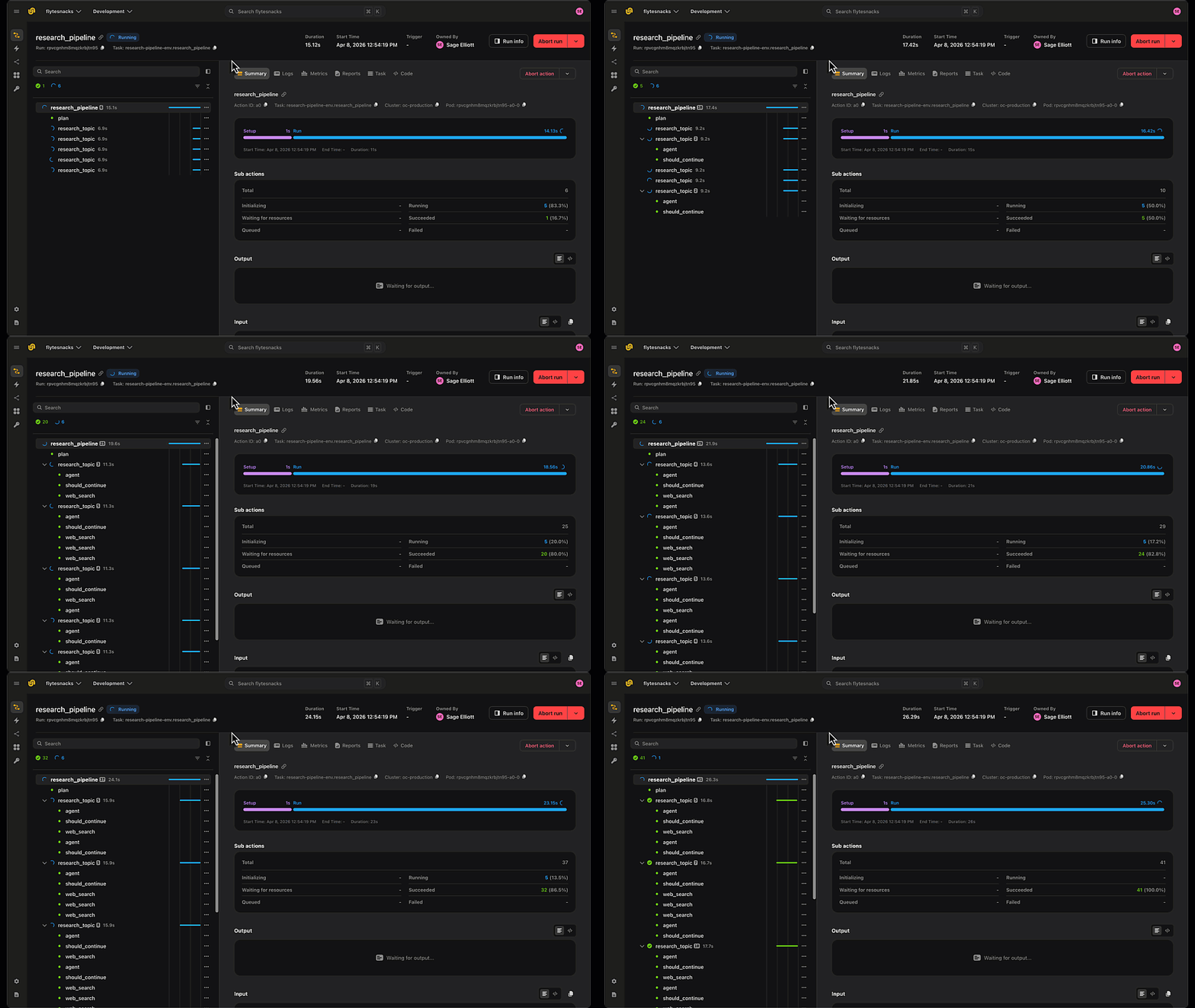
LangGraph Research Agent running in Flyte 2 on Union
The Architecture
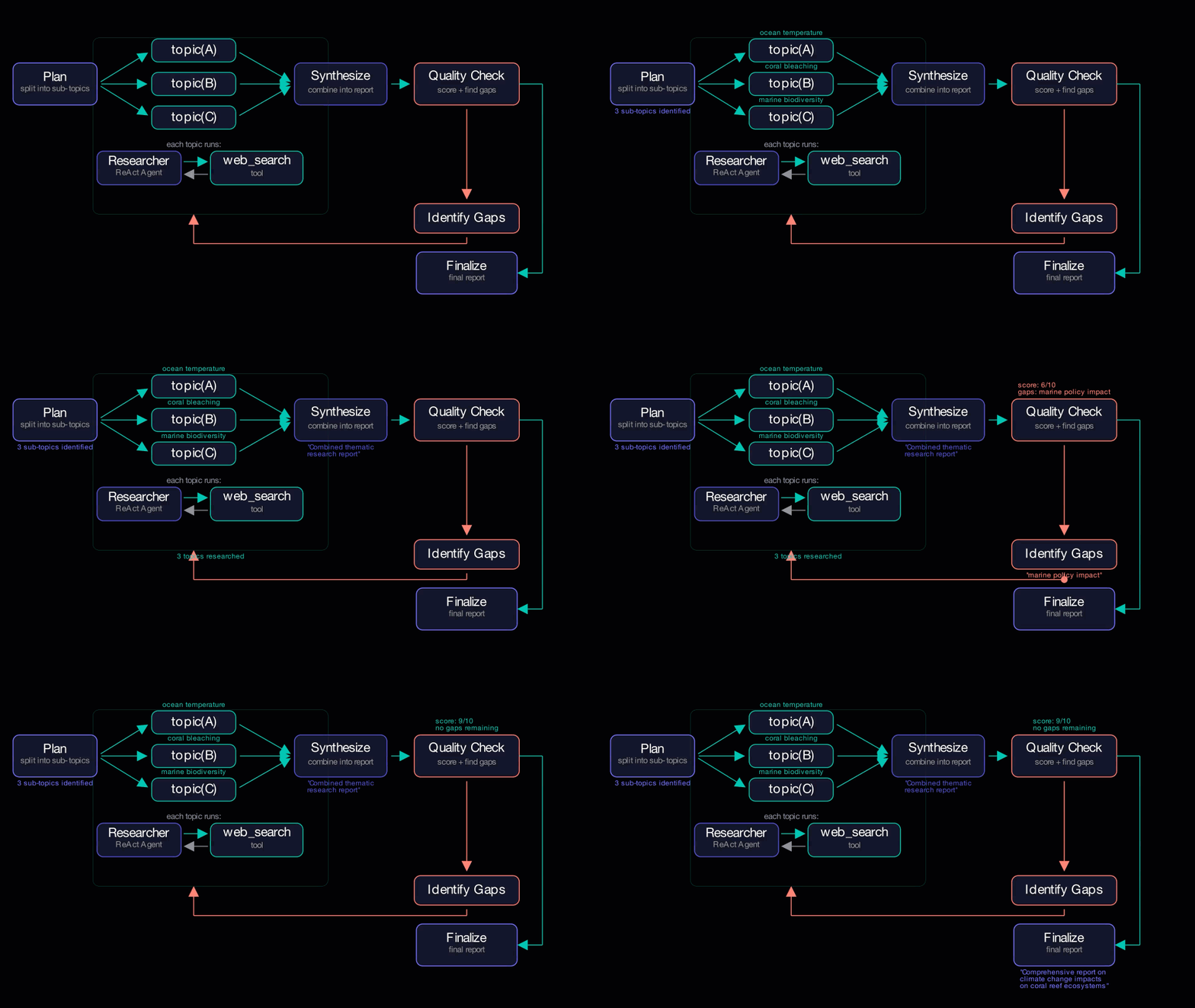
The agent pipeline follows a plan-research-synthesize loop that can scale:
Copied to clipboard!
research_pipeline (LangGraph graph, running inside a Flyte task)
  ├── plan_topics (Flyte task) → split query into sub-topics
  ├── research (Send fan-out → Flyte tasks)
  │     ├── research_topic("topic A")  ┐
  │     ├── research_topic("topic B")  ├── parallel Flyte tasks
  │     └── research_topic("topic C")  ┘
  ├── synthesize (Flyte task) → combine into report
  ├── quality_check (Flyte task) → score + identify gaps
  │     ├── gaps found → identify_gaps → Send fan-out → research again
  │     └── good enough → finalize
  └── finalize → final report
LangGraph owns the control flow: planning, routing, quality gates, looping. Flyte owns the compute: each step runs as an isolated task with its own container, resources, and live report in the UI. The graph nodes are thin wrappers that dispatch to Flyte tasks - all the actual LLM calls live in the tasks themselves. Locally, those tasks execute as async calls. On a Flyte cluster, they spin up as independent containers. Same code either way.
Setting Up the Environment
The full setup instructions and requirements are in the GitHub repo. Here we'll focus on the key configuration decisions.
First, the Flyte configuration. A single TaskEnvironment defines everything the tasks need: the container image, dependencies, secrets, and resources.
When running locally, secrets are pulled from your .env file instead of a secrets backend. The TaskEnvironment still applies though which makes caching, retries, and logging all behave the same way locally as they do on the cluster.
`.with_requirements()` points at the project's requirements.txt, so the container image gets the same dependencies you install locally. Each task gets 2 CPUs and 2GB of memory.
Data Models
Let's also take a look at our Data Models Before diving into the tasks, we define typed data contracts that flow between them. These Pydantic models give you type safety at task boundaries and serialize natively through Flyte.
Copied to clipboard!
"""Pydantic models for the research pipeline."""

from pydantic import BaseModel


class TopicReport(BaseModel):
    topic: str
    report: str


class QualityResult(BaseModel):
    score: int
    gaps: list[str]


class PipelineResult(BaseModel):
    query: str
    report: str
    sub_reports: list[TopicReport]
    score: int
    iterations: int
TopicReport carries each sub-topic's research output. QualityResult captures the evaluation score and any identified gaps. PipelineResult wraps the final output with all the metadata. When Flyte passes these between tasks, they're serialized and deserialized automatically, no manual JSON parsing required.
The Research Agent (ReAct Subgraph)
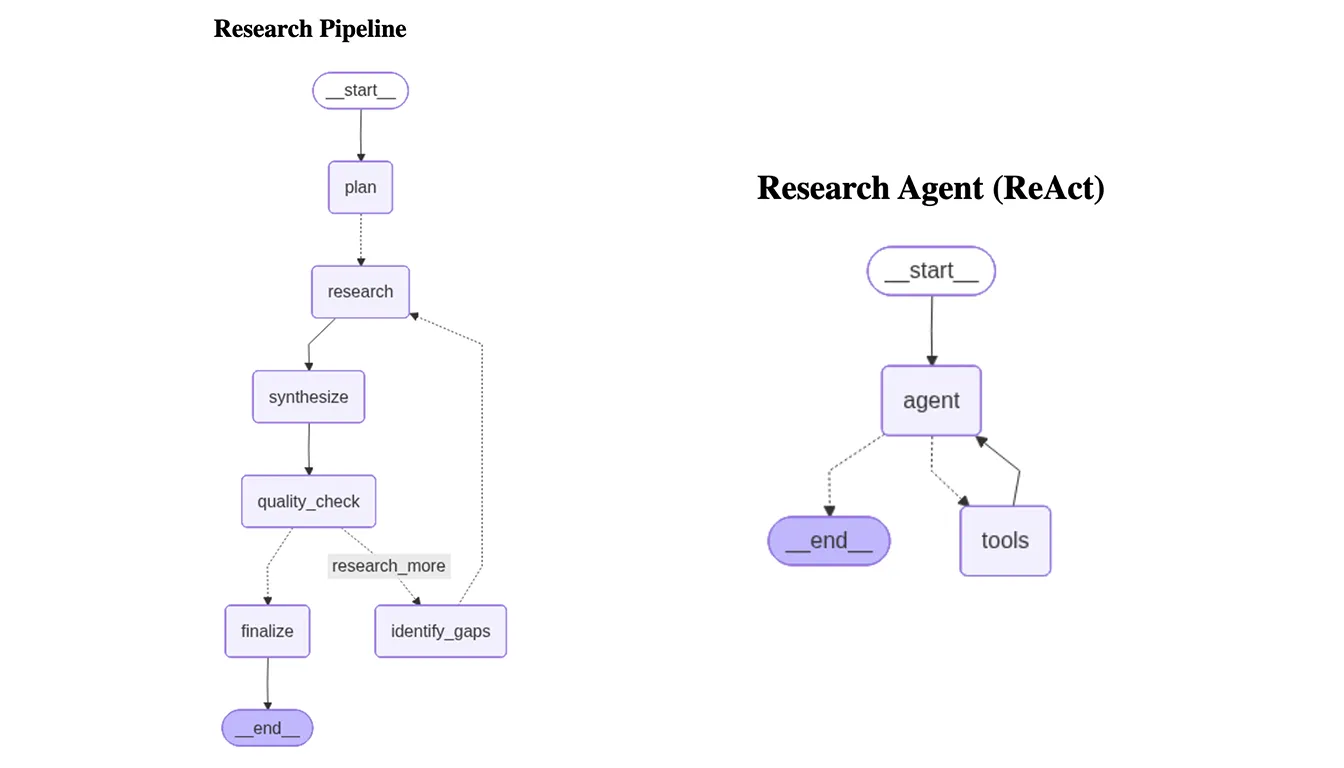
The Research Agent (ReAct Subgraph) Each sub-topic gets its own ReAct agent. The LLM decides whether to call a tool, the tool executes, the result feeds back, and the loop repeats until the agent has enough information to write a summary. max_searches keeps it bounded.
Copied to clipboard!
# graph.py
import logging
import flyte
from langchain_openai import ChatOpenAI
from langchain_core.messages import SystemMessage
from langgraph.graph import StateGraph, MessagesState
from langgraph.prebuilt import ToolNode
from tools.search import create_search_tool

log = logging.getLogger(__name__)

def build_research_subgraph(
    openai_api_key: str,
    tavily_api_key: str,
    max_searches: int = 3,
    model: str = "gpt-4.1-nano",
):
    """Build a ReAct research agent that uses Tavily search."""
    web_search = create_search_tool(tavily_api_key)
    tools = [web_search]
    llm = ChatOpenAI(model=model, api_key=openai_api_key).bind_tools(tools)

    system_prompt = f"""\
You are a research agent. Your job is to thoroughly research a topic by searching the web. \
Use the web_search tool up to {max_searches} times to gather information from different angles. \
After gathering enough information, write a clear research summary with key findings and sources."""

    @flyte.trace
    async def agent(state: MessagesState) -> MessagesState:
        messages = [SystemMessage(content=system_prompt)] + state["messages"]
        response = llm.invoke(messages)

        if hasattr(response, "tool_calls") and response.tool_calls:
            for tc in response.tool_calls:
                log.info(f"[Research] Tool call: {tc['name']}({tc['args']})")
        elif response.content:
            log.info(f"[Research] Response: {response.content[:200]}")

        return {"messages": [response]}

    @flyte.trace
    async def should_continue(state: MessagesState) -> str:
        last = state["messages"][-1]
        if hasattr(last, "tool_calls") and last.tool_calls:
            return "tools"
        return "__end__"

    graph = StateGraph(MessagesState)
    graph.add_node("agent", agent)
    graph.add_node("tools", ToolNode(tools))
    graph.set_entry_point("agent")
    graph.add_conditional_edges("agent", should_continue, {
        "tools": "tools",
        "__end__": "__end__",
    })
    graph.add_edge("tools", "agent")

    return graph.compile()
The `@flyte.trace` decorator gives you structured tracing in the Flyte UI, so every LLM call and tool call shows up as a named, timestamped entry. When you have multiple research agents running in parallel, this is what lets you see exactly what each one did without sifting through interleaved logs. You can use @flyte.trace on any function running within a `TaskEnvironment`.
The search tool itself is straightforward: a Tavily client wrapped as a LangChain `@tool`, with `@flyte.trace` added so searches show up alongside LLM calls in the same trace view.
Copied to clipboard!
# tools/search.py
import logging
from langchain_core.tools import tool
from tavily import TavilyClient
import flyte

log = logging.getLogger(__name__)

def create_search_tool(tavily_api_key: str):
    """Create a web_search tool bound to a Tavily API key."""
    tavily = TavilyClient(api_key=tavily_api_key)

    @tool
    @flyte.trace
    async def web_search(query: str) -> str:
        """Search the web for information on a topic. Use this to find current facts, data, and sources."""
        log.info(f"Searching: {query}")
        results = tavily.search(query=query, max_results=3)
        formatted = ""
        for r in results.get("results", []):
            formatted += f"- {r['title']}: {r['content'][:300]}\n  {r['url']}\n\n"
        return formatted or "No results found."

    return web_search
The Flyte Tasks: Every Step is Visible and Durable
Now we get to the interesting part. Rather than having LangGraph nodes call the LLM directly (where synthesis and quality evaluation could just be traces buried inside the pipeline task), we break each step out into its own Flyte task. That means every step gets its own compute, its own live report in the UI, and its own logs. The LangGraph graph nodes basically become thin wrappers that dispatch to these tasks.
Copied to clipboard!
# workflow.py
import json
import os
import markdown
import flyte
import flyte.report
from langchain_openai import ChatOpenAI
from langchain_core.messages import HumanMessage
from config import base_env
from models import TopicReport, QualityResult, PipelineResult
from graph import build_pipeline_graph, build_research_subgraph

env = base_env
MODEL = "gpt-4.1-nano"

def md_to_html(text: str) -> str:
    """Convert markdown to HTML for Flyte reports."""
    return markdown.markdown(text, extensions=["tables", "fenced_code"])
Planning Task
The planning task asks the LLM to decompose the query into sub-topics. It requests a JSON array directly, no natural language parsing, and falls back to the original query if the response isn't valid JSON.
Copied to clipboard!
@env.task(report=True)
async def plan_topics(query: str, num_topics: int = 3) -> list[str]:
    """Break a research query into focused sub-topics."""
    await flyte.report.replace.aio(
        f"<h2>Planning</h2><p>Breaking query into {num_topics} sub-topics...</p>"
    )
    await flyte.report.flush.aio()

    openai_api_key = os.getenv("OPENAI_API_KEY")
    llm = ChatOpenAI(model=MODEL, api_key=openai_api_key)

    response = llm.invoke(
        f"Break this research question into exactly {num_topics} focused sub-topics. "
        f"Return ONLY a JSON array of strings, nothing else.\n\nQuestion: {query}"
    )
    try:
        topics = json.loads(response.content)
    except json.JSONDecodeError:
        topics = [query]

    topics = topics[:num_topics]

    topic_html = "".join(f"<li>{t}</li>" for t in topics)
    await flyte.report.replace.aio(
        f"<h2>Planning</h2><p>Sub-topics:</p><ul>{topic_html}</ul>"
    )
    await flyte.report.flush.aio()

    return topics
Since planning is its own Flyte task, you can watch it happen in real time. The report starts with "Breaking query into sub-topics..." and updates to show the final topic list once the LLM responds. If something goes wrong with planning, you see it immediately instead of digging through logs from a monolithic pipeline task.
Research Task
Each sub-topic gets its own task running the ReAct subgraph. The task returns a typed `TopicReport` so Flyte handles serialization automatically.
Copied to clipboard!
@env.task(report=True)
async def research_topic(topic: str, max_searches: int = 2) -> TopicReport:
    """Run the ReAct research agent on a single sub-topic."""
    openai_api_key = os.getenv("OPENAI_API_KEY")
    tavily_api_key = os.getenv("TAVILY_API_KEY")

    await flyte.report.replace.aio(f"<h2>Researching: {topic}</h2><p>Running searches...</p>")
    await flyte.report.flush.aio()

    graph = build_research_subgraph(
        openai_api_key=openai_api_key,
        tavily_api_key=tavily_api_key,
        max_searches=max_searches,
        model=MODEL,
    )
    result = await graph.ainvoke({
        "messages": [HumanMessage(content=f"Research this topic: {topic}")]
    })
    report = result["messages"][-1].content

    await flyte.report.replace.aio(f"<h2>{topic}</h2>{md_to_html(report)}")
    await flyte.report.flush.aio()

    return TopicReport(topic=topic, report=report)
Synthesis Task
The synthesis task takes all the sub-topic reports and asks the LLM to combine them into a single cohesive report.
Copied to clipboard!
@env.task(report=True)
async def synthesize(query: str, results: list[TopicReport]) -> str:
    """Combine sub-topic research reports into a unified synthesis."""
    await flyte.report.replace.aio(
        f"<h2>Synthesis</h2><p>Combining {len(results)} reports...</p>"
    )
    await flyte.report.flush.aio()

    openai_api_key = os.getenv("OPENAI_API_KEY")
    llm = ChatOpenAI(model=MODEL, api_key=openai_api_key)

    sections = "\n\n---\n\n".join(
        f"## {r.topic}\n\n{r.report}" for r in results
    )

    response = llm.invoke(
        f"You have research reports on sub-topics of this question:\n\n{query}\n\n"
        f"Sub-topic reports:\n\n{sections}\n\n"
        f"Write a comprehensive report that synthesizes all findings. "
        f"Organize by theme, highlight connections between sub-topics, "
        f"and end with key takeaways."
    )
    synthesis = response.content

    await flyte.report.replace.aio(f"<h2>Synthesis</h2>{md_to_html(synthesis)}")
    await flyte.report.flush.aio()

    return synthesis
Quality Check Task
The quality check evaluates the synthesis and returns a typed `QualityResult` with the score and any gaps found.
Copied to clipboard!
@env.task(report=True)
async def quality_check(query: str, synthesis: str) -> QualityResult:
    """Evaluate report quality and identify gaps."""
    await flyte.report.replace.aio(
        "<h2>Quality Check</h2><p>Evaluating report quality...</p>"
    )
    await flyte.report.flush.aio()

    openai_api_key = os.getenv("OPENAI_API_KEY")
    llm = ChatOpenAI(model=MODEL, api_key=openai_api_key)

    response = llm.invoke(
        f'Evaluate this research report for the question: {query}\n\n'
        f'Report:\n{synthesis}\n\n'
        f'Rate the report quality from 1-10 and identify any gaps or missing perspectives. '
        f'Return JSON: {{"score": <int>, "gaps": [<string>, ...]}}\n'
        f'If the report is comprehensive (score >= 8) or there are no significant gaps, '
        f'return an empty gaps list.'
    )

    try:
        evaluation = json.loads(response.content)
        score = evaluation.get("score", 8)
        gaps = evaluation.get("gaps", [])
    except json.JSONDecodeError:
        score = 8
        gaps = []

    result = QualityResult(score=score, gaps=gaps)

    gap_html = "".join(f"<li>{g}</li>" for g in result.gaps) if result.gaps else "<li>None</li>"
    await flyte.report.replace.aio(
        f"<h2>Quality Check</h2>"
        f"<p><b>Score:</b> {result.score}/10</p>"
        f"<p><b>Gaps:</b></p><ul>{gap_html}</ul>"
    )
    await flyte.report.flush.aio()

    return result
The Pipeline Graph: Where LangGraph Meets Flyte Tasks
With the compute living in Flyte tasks, the pipeline graph becomes pure orchestration. Each node extracts the right arguments from state, calls a Flyte task, and returns the result as a state update.
Copied to clipboard!
# graph.py
from langgraph.types import Send

def build_pipeline_graph(
    plan_task,
    research_task,
    synthesize_task,
    quality_check_task,
    **_kwargs,
):
    from models import TopicReport

    class PipelineState(TypedDict, total=False):
        query: str
        num_topics: int
        max_searches: int
        iteration: int
        max_iterations: int
        topics: list[str]
        research_results: Annotated[list[dict], operator.add]  # append-only
        synthesis: str
        score: int
        gaps: list[str]
        final_report: str
The `research_results` field uses `Annotated[list[dict], operator.add]`, LangGraph's reducer pattern. When multiple `Send` branches return concurrently, their results get concatenated into a single list automatically rather than overwriting each other.
The graph builder accepts four Flyte tasks as parameters. It has no LLM instance of its own - all LLM calls happen inside the tasks.
Graph Nodes as Flyte Task Wrappers
Each node extracts what it needs from state, calls the corresponding Flyte task, and returns a state update. Here's the plan node:
`route_to_research` returns a list of `Send` objects, one per topic. Each `Send` targets the "research" node with a different topic, and because `route_to_research` is used by both the initial plan and the gap-filling loop, the same fan-out logic handles both cases.
Copied to clipboard!
# graph.py
def route_to_research(state: PipelineState) -> list[Send]:
        topics = state.get("gaps") or state["topics"]
        max_searches = state.get("max_searches", 2)
        return [
            Send("research", {"topic": t, "max_searches": max_searches})
            for t in topics
        ]
The research node calls the Flyte task and returns a typed `TopicReport`, converted to a dict for the graph state:
This is the key integration point. `research_task` is a Flyte task passed in as a parameter, but LangGraph has no awareness of that. It just awaits the result. On a Flyte cluster, each of those calls spins up a separate container with its own CPU, memory, and execution context. Three topics means three containers running in parallel, each with its own ReAct agent doing web searches independently.
Synthesis and Quality Check Nodes
The synthesis and quality check nodes follow the same pattern, extract state, call task, return update. They use `.override(short_name=...)` to give each iteration a distinct name in the Flyte UI:
If gaps are found and the iteration limit hasn't been hit, the graph routes back through `identify_gaps`, which triggers another `route_to_research` fan-out. More `Send` calls, more Flyte tasks, more containers. The loop continues until the quality score clears the threshold or the iteration budget runs out.
The defaults here (score threshold of 8, 2 max iterations) are conservative. For deeper research tasks you'll likely want to increase `max_iterations` and tune the evaluation prompt to match your quality bar.
Building the Agent Graph
With our nodes defined, we wire them into a `StateGraph`. The graph moves linearly from planning through research and synthesis, until it hits the quality check where it either finalizes or loops back to fill gaps.
We can visualize the compiled graph to verify the control flow. This will also be stored in a report tab within the Flyte run.
The Orchestrator
The orchestrator is the top-level Flyte task that builds the pipeline graph and passes in all four Flyte tasks as compute backends:
Copied to clipboard!
#workflow.py
@env.task(report=True)
async def research_pipeline(
    query: str,
    num_topics: int = 3,
    max_searches: int = 2,
    max_iterations: int = 2,
) -> PipelineResult:
    openai_api_key = os.getenv("OPENAI_API_KEY")
    tavily_api_key = os.getenv("TAVILY_API_KEY")

    # Build the pipeline graph, passing all Flyte tasks as compute backends
    pipeline = build_pipeline_graph(
        openai_api_key=openai_api_key,
        tavily_api_key=tavily_api_key,
        plan_task=plan_topics,
        research_task=research_topic,
        synthesize_task=synthesize,
        quality_check_task=quality_check,
        model=MODEL,
    )

    # Visualize the graphs in report tabs
    graph_tab = flyte.report.get_tab("Agent Graphs")
    png_bytes = pipeline.get_graph().draw_mermaid_png()
    img_b64 = base64.b64encode(png_bytes).decode()
    graph_tab.log(f"""\
<h2>Research Pipeline</h2>\
<img src="data:image/png;base64,{img_b64}" alt="Research pipeline" />""")
    await flyte.report.flush.aio()

    # Run the pipeline - LangGraph controls the flow, Flyte tasks run the compute
    result = await pipeline.ainvoke({
        "query": query,
        "num_topics": num_topics,
        "max_searches": max_searches,
        "max_iterations": max_iterations,
        "iteration": 0,
        "topics": [],
        "research_results": [],
        "synthesis": "",
        "score": 0,
        "gaps": [],
        "final_report": "",
    })

    # Build the final report
    final_report = result["final_report"]
    sub_reports = [TopicReport(**r) for r in result["research_results"]]
    score = result.get("score", 0)
    iteration = result.get("iteration", 1) - 1

    return PipelineResult(
        query=query,
        report=final_report,
        sub_reports=sub_reports,
        score=score,
        iterations=iteration,
    )
The orchestrator returns a typed `PipelineResult` with the final report, sub-reports, score, and iteration count. All tasks use `report=True`, giving each one a live HTML report in the Flyte UI. When you open a pipeline run, you see `plan_topics`, each `research_topic`, `synthesize-1`, `quality-1`, and so on - each with its own status, logs, and report.
Why This Combination Works
LangGraph and Flyte are solving different problems, and they compose naturally.
LangGraph gives you an agent logic framework: conditional routing, state management, tool calling, quality gates, iterative loops. It's a graph framework for building agents that reason and adapt.
Flyte gives you production compute and durability: container isolation, resource allocation, secrets management, caching, retries, observability, and a UI to watch it all happen. It's an orchestrator built for running AI workloads at scale.
Every pipeline step is a Flyte task, not just the research fan-out, but planning, synthesis, and quality evaluation too. That means you can watch synthesis happen in the UI, inspect its report, and cache its output. You can see the quality score and gaps update live. You know exactly when and how the query was decomposed. The graph nodes are just wrappers. state in, task call, state out. and all the real work happens in observable, cacheable, retriable Flyte tasks.
The Send + Flyte task pattern is the bridge for parallelism. Each `research_topic` call runs in its own container with dedicated CPU and memory, so there's no shared process and no resource contention. Adding more topics means more containers, spun up automatically. And if a container crashes, Flyte retries it without rerunning the entire pipeline.
The best part: none of this requires changing the code between local testing and production. `flyte run --local` runs everything in-process. `flyte run` on a cluster fans out to containers. Same Send, same graph, same tasks.
Running It
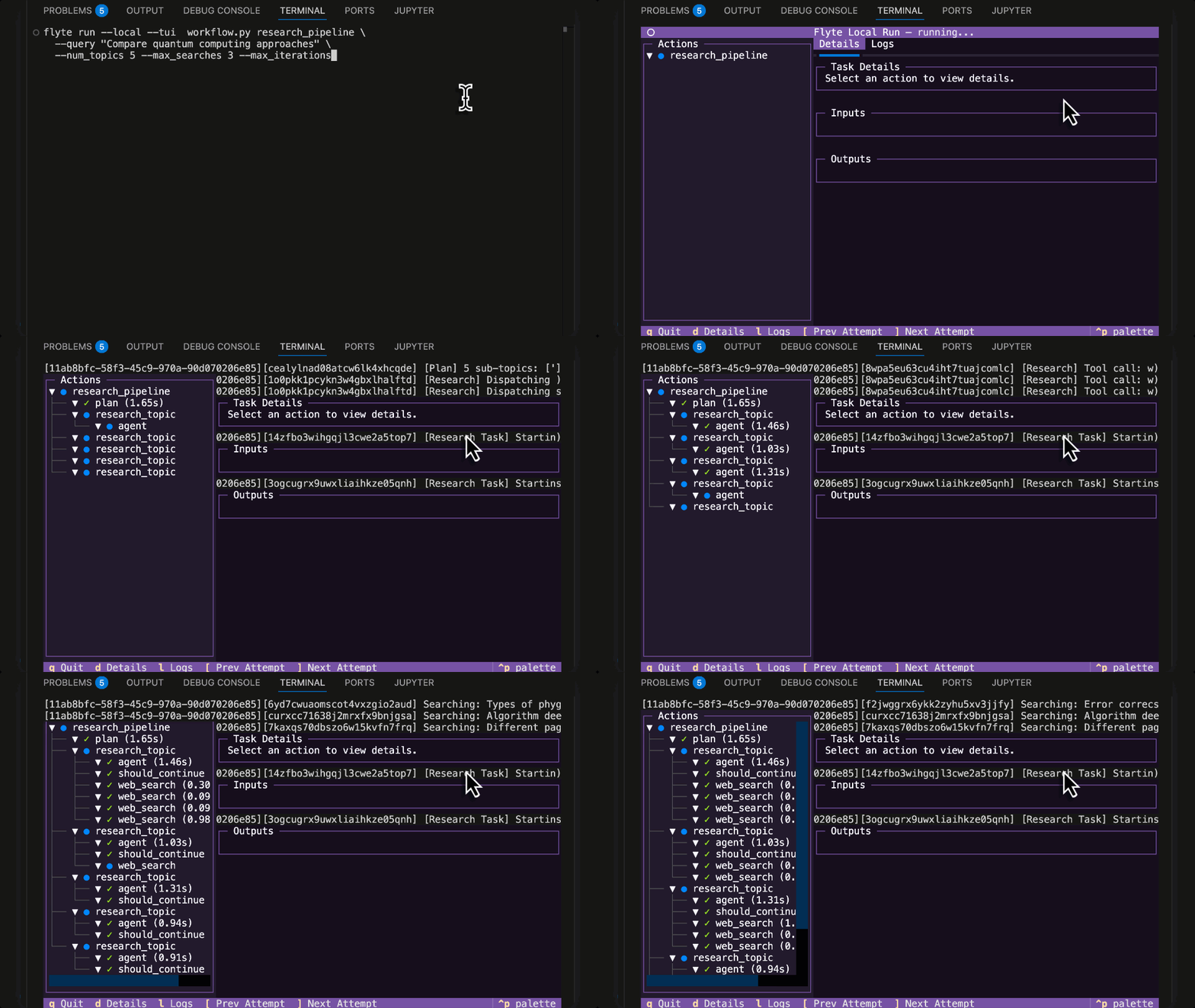
Let's first run it locally with the Flyte TUI (terminal user interface). No Docker or cluster setup required. The local Flyte SDK gives you a workflow interface, reports, caching, and retries from just `pip install flyte[tui]`.
Copied to clipboard!
flyte run --local --tui workflow.py research_pipeline \
  --query "Compare quantum computing approaches: superconducting vs trapped ion"
Running LangGraph Agent locally with the Flyte 2 Agent TUI
Now let's run it on a remote cluster for true parallelism and production durability:
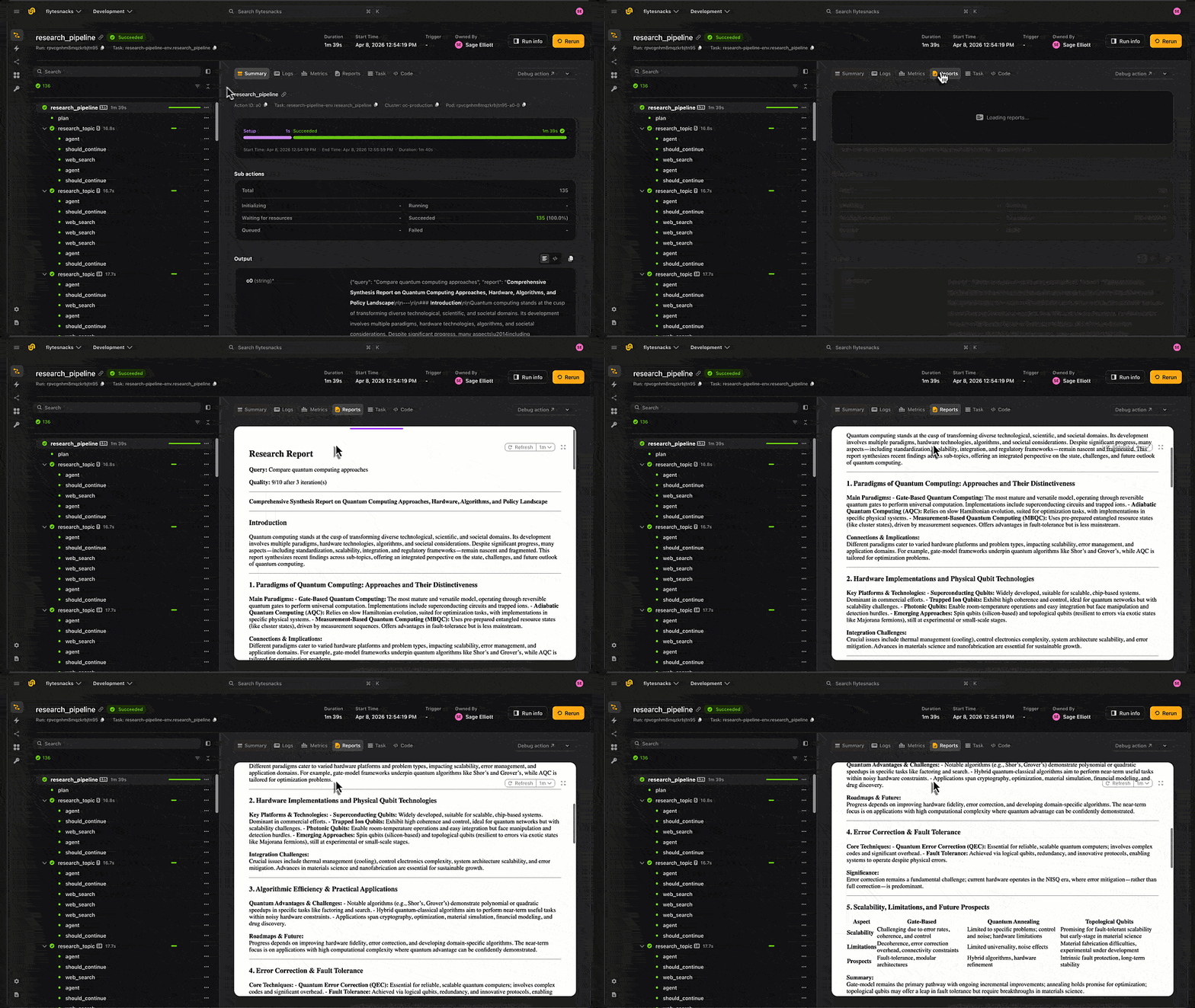
The `--num_topics` flag controls how many parallel researchers to spin up. On a cluster, `--num_topics 5` means five containers running simultaneously, each with its own ReAct agent doing independent web searches. If the quality gate finds gaps, LangGraph routes back into another fan-out and Flyte spins up more containers for follow-up research. Every step along the way, planning, synthesis, quality evaluation , runs as its own task with its own report.
LangGraph Research Agent running in Flyte 2 on Union
Each run generates a report you can review directly in the Flyte UI or the local TUI, including the final synthesized output, quality score, and per-topic research results.
Report generated by LangGraph Agent stored in Flyte
Bonus: Building and Deploying an Agent UI
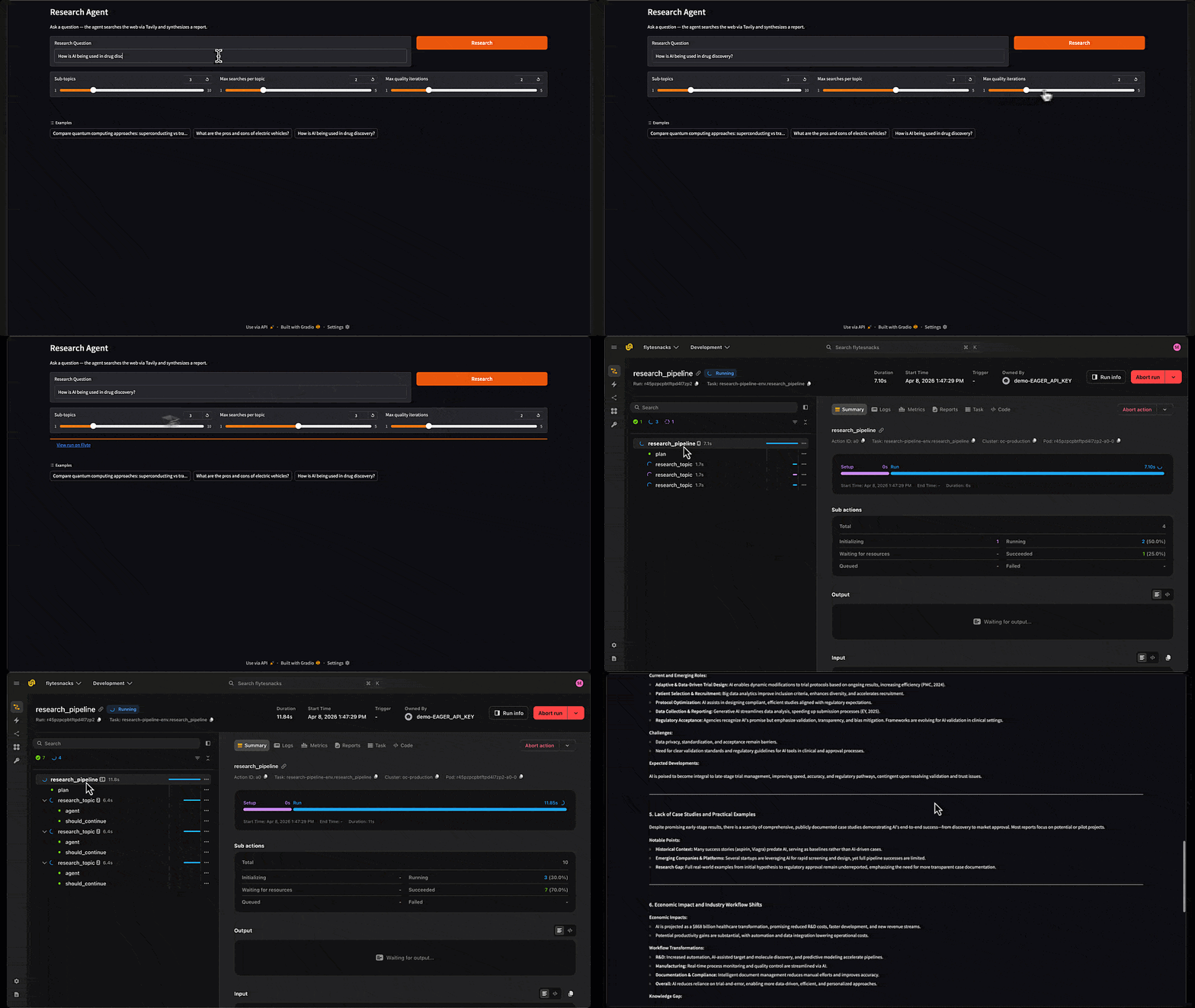
The pipeline works great from the CLI, but sometimes you want a UI to interact with your agents. With Flyte's `AppEnvironment`, you can build a Gradio app that calls the pipeline as a registered task and deploy it to a cluster.
Gradio UI deployed on Flyte 2 to launch LangGraph agent runs
The app supports three deployment modes:
Local app + local task: `RUN_MODE=local python app.py` - Everything runs in-process locally
Local app + remote task: `python app.py` - Gradio runs locally, but kicks off the pipeline on a Flyte cluster
Full remote: `flyte deploy app.py serving_env` - The entire app runs on the cluster
There's one prerequisite for the remote modes: you need to register the tasks on the cluster first with `flyte deploy workflow.py env`. This builds the container images and makes the tasks available for the app to reference.
The `scaling` config means the app scales down to zero replicas after 5 minutes of inactivity and back up to one when traffic arrives, so you're not paying for a running container when nobody's using it. `AppEnvironment` is similar to `TaskEnvironment`: it defines the image and resources, but it's designed for long-running apps rather than batch tasks. Since the app calls the pipeline via `remote.Task.get()` rather than importing it directly, it doesn't need secrets or the pipeline source files - those live on the `TaskEnvironment` where the actual work runs.
Remote Task Reference
The app uses `remote.Task.get()` to fetch a pre-registered task reference from the Flyte control plane:
Copied to clipboard!
# Pre-registered task reference - fetched from control plane at runtime.
# Deploy tasks first: flyte deploy workflow.py env
research_pipeline_task = remote.Task.get(
    "research-pipeline-env.research_pipeline",
    project="flytesnacks",
    domain="development",
    auto_version="latest",
)
The `auto_version="latest"` flag means the app always picks up the most recently registered version. When you update the pipeline code, just re-run `flyte deploy workflow.py env` and the app starts using the new version automatically, no app redeployment needed.
In local mode, the app falls back to a direct import instead:
Copied to clipboard!
def run_query(query, num_topics, max_searches, max_iterations):
    """Kick off the research pipeline as a Flyte task, stream URL then result."""
    if RUN_MODE == "local":
        from workflow import research_pipeline
        task = research_pipeline
    else:
        task = research_pipeline_task

    result = flyte.run(
        task,
        query=query,
        num_topics=int(num_topics),
        max_searches=int(max_searches),
        max_iterations=int(max_iterations),
    )
This branching keeps the local development loop fast,no cluster connection needed, while remote mode dispatches to the registered task on the cluster.
The rest of the function streams results back to the UI. It shows the run URL immediately so you can watch the pipeline execute in the Flyte UI, then waits for completion and renders the report:
Copied to clipboard!
# Show the run link immediately
    run_url = getattr(result, "url", None)
    link_html = ""
    if run_url:
        url_str = str(run_url)
        # Rewrite internal cluster URL to the external UI URL
        if "flyte-binary-http" in url_str or "flyte:" in url_str:
            from urllib.parse import urlparse
            parsed = urlparse(url_str)
            url_str = f"{FLYTE_UI_URL}{parsed.path}"
        if url_str.startswith("http"):
            link_html = f'<a href="{url_str}" target="_blank">View run on Flyte</a>'
            yield "", link_html
        else:
            link_html = f'<code style="font-size:0.85em;color:#666;">Local run: {url_str}</code>'
            yield "", link_html
    else:
        yield "", "Running..."

    # Wait for completion, then show the report
    result.wait()
    output = result.outputs()[0]
    # Handle both PipelineResult (local) and dict (remote) outputs
    if hasattr(output, "report"):
        report = output.report
        score = output.score
        iterations = output.iterations
    else:
        report = output["report"]
        score = output.get("score", "N/A")
        iterations = output.get("iterations", "N/A")

    header = f"**Quality:** {score}/10 | **Iterations:** {iterations}\n\n---\n\n"
    yield header + report, link_html
Since the pipeline returns a typed `PipelineResult`, the app handles both the Pydantic model (local mode) and dict (remote mode) outputs.
The Gradio interface itself is standard: sliders for parameters, a button to kick it off, and a markdown output for the report:
Copied to clipboard!
def create_demo():
    import gradio as gr

    with gr.Blocks(title="Research Agent") as demo:
        gr.Markdown("# Research Agent\nAsk a question - the agent searches the web via Tavily and synthesizes a report.")

        with gr.Row():
            query = gr.Textbox(label="Research Question", placeholder="Compare quantum computing approaches: superconducting vs trapped ion", scale=3)
            submit = gr.Button("Research", variant="primary", scale=1)

        with gr.Row():
            num_topics = gr.Slider(minimum=1, maximum=10, value=3, step=1, label="Sub-topics")
            max_searches = gr.Slider(minimum=1, maximum=5, value=2, step=1, label="Max searches per topic")
            max_iterations = gr.Slider(minimum=1, maximum=5, value=2, step=1, label="Max quality iterations")

        run_link = gr.HTML()
        report = gr.Markdown(label="Report")

        inputs = [query, num_topics, max_searches, max_iterations]
        submit.click(fn=run_query, inputs=inputs, outputs=[report, run_link])
        query.submit(fn=run_query, inputs=inputs, outputs=[report, run_link])

    return demo
To deploy to a cluster, the `@serving_env.server` decorator tells Flyte how to launch it:
Copied to clipboard!
@serving_env.server
def app_server():
    """Launch the Gradio app (called by Flyte on remote deployment)."""
    flyte.init_in_cluster(project="flytesnacks", domain="development")
    create_demo().launch(server_name="0.0.0.0", server_port=7860, share=False)

if __name__ == "__main__":
    if RUN_MODE != "local":
        flyte.init_from_config()
    create_demo().launch()
Run the app:
Copied to clipboard!
RUN_MODE=local python app.py

# Local app, remote pipeline execution (requires: flyte deploy workflow.py env)
python app.py

# Deploy the whole app to a Flyte cluster
flyte deploy workflow.py env        # register tasks first
flyte deploy app.py serving_env     # then deploy the UI
The remote modes require registering the tasks first (`flyte deploy workflow.py env`) so the app can find them via `remote.Task.get()`. The app itself has no knowledge of LangGraph or the pipeline internals, it just calls `research_pipeline` as a Flyte task and renders whatever comes back.
LangGraph is great at agent logic orchestration. Flyte is great at running compute at scale. Instead of picking one, use both: let LangGraph control the what and Flyte control the where.
The pattern we've landed on is: LangGraph's `StateGraph` defines the control flow, plan, fan-out, synthesize, evaluate, loop, while every step that does real work is a Flyte task. The graph nodes are wrappers: state in, task call, state out. All the LLM calls, reports, and compute live in the tasks, which means every step is independently observable, cacheable, and retriable.
The Send API is the natural seam between them for parallelism. What starts as a fan-out in a graph becomes parallel containers on a cluster, with no code changes required. But it's not just research that benefits - synthesis, quality evaluation, and planning all run as their own tasks too, giving you full visibility into every stage of the pipeline.