

Not every project needs a dedicated config management system. If you’re early, moving fast, and your configuration is small, keeping it inline is fine. This isn’t a day-zero problem.But at some point, the config grows. You want to experiment with different prompt variants, swap model settings without touching your code or run the same pipeline across different environments. And when that moment comes, having your config tangled up in your code is what slows you down.
Hydra is a clean solution to that. It lets you keep your logic and your configuration separate, and gives you a structured way to compose, override, and sweep configs without boilerplate.
Why config management breaks down
The issue isn’t unique to anyone. Researchers at Meta ran into it scaling ML experiments. Data scientists hit it when tuning models across hardware configurations. And now, with agentic workloads, it's showing up again with even more surface area.
The core tension is simple: your code is meant to express logic. Your configuration is meant to express intent: what values to use, what to test, what to optimize for. When those two things live together in the same file, it quickly becomes harder to manage.
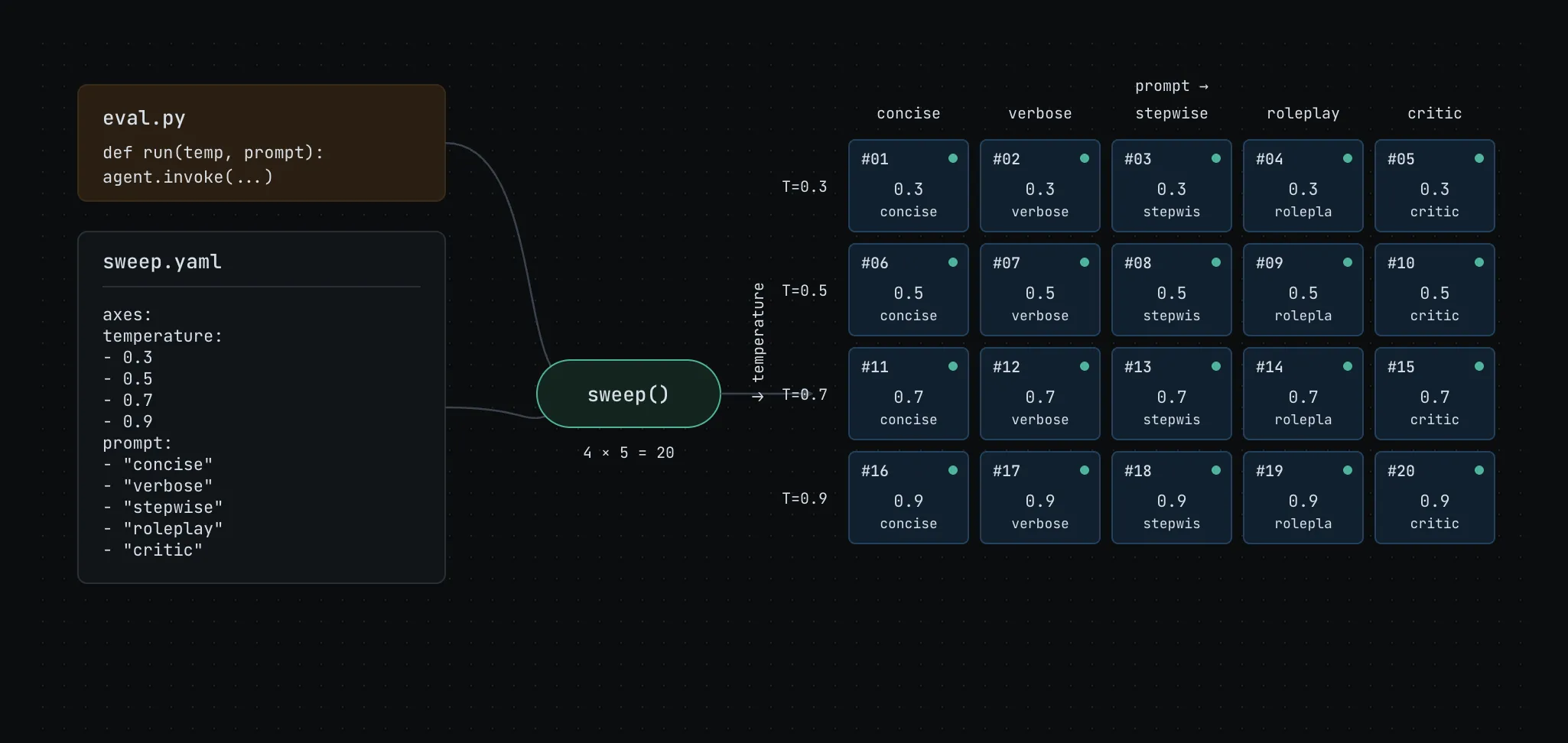
Say you want to sweep across 20 combinations of model temperature and prompt variants for an agentic eval. That’s not a small config. And if the only way to manage it is inside your script, you're writing boilerplate instead of solving the actual problem.
The ML case: experiments at scale
The problem first showed up clearly in ML research when teams needed to tune hundreds of hyperparameters across different hardware configurations and actually keep track of what worked.
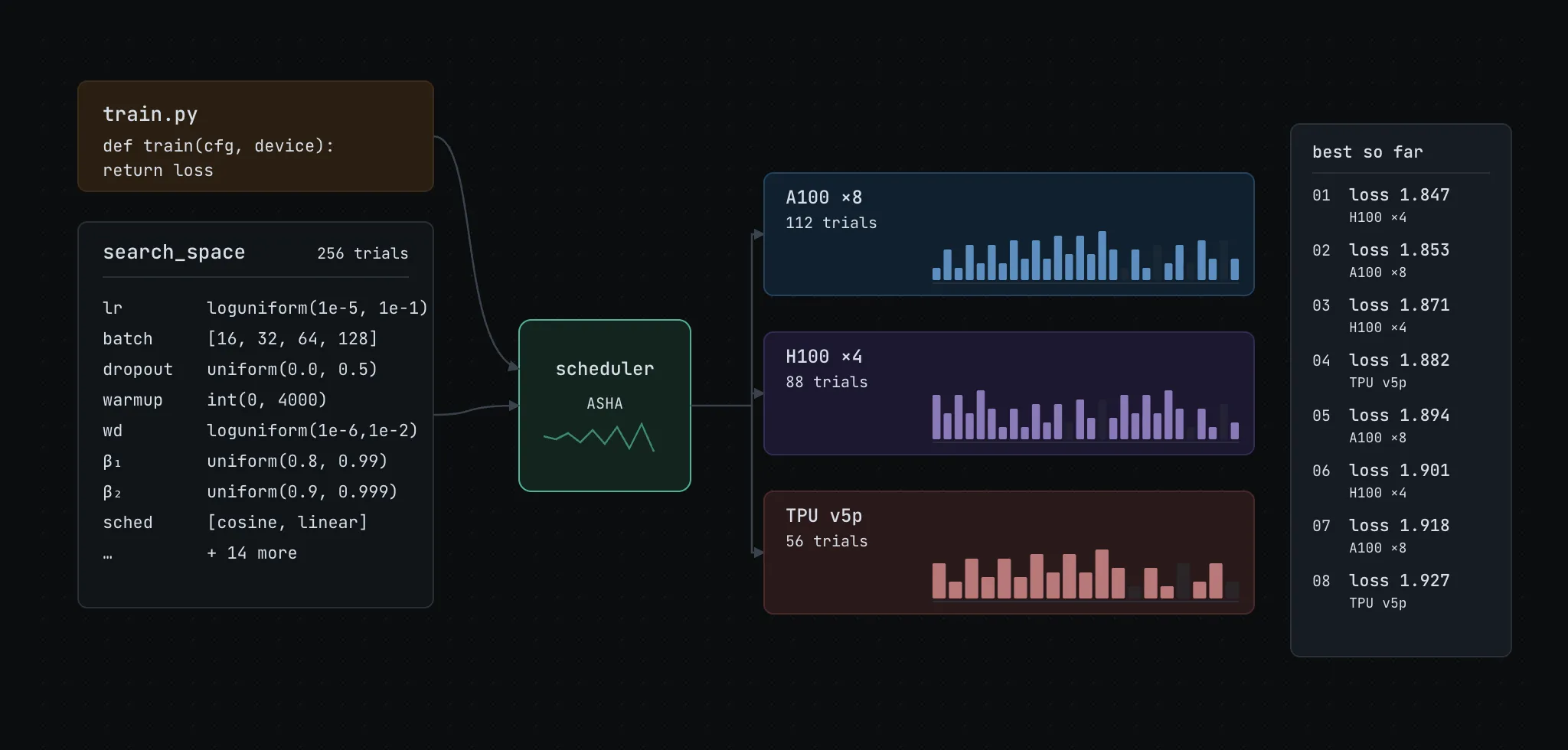
You could manage it all inside your training script, and that works. But it tends to get harder to maintain over time. Keeping code and config separate isn’t strictly necessary, but it usually makes things easier from a modularity standpoint. It also helps avoid the repetitive boilerplate you’d otherwise write to try different combinations, log results, and keep track of what ran. This work tends to look the same across most projects and teams.
That’s the gap Hydra was built to fill.
The agentic case: evals are config-heavy too
ML hasn’t slowed down, but agentic workloads have introduced a new class of the same problem.
Evals are where the complexity becomes impossible to ignore, but it was already there. It shows up when you’re defining agent behavior: which tools to enable, how many retries before a fallback, what timeout thresholds to set. It shows up in prompt versioning, when your system prompt evolves and you need v1 and v2 to coexist cleanly across dev, staging, and production. It shows up in multi-agent systems, where routing rules and delegation parameters need to live somewhere structured.
Evals just make it undeniable. They require systematic exploration of edge cases, multiple prompt variations, different model settings, and combinations of all three. The configuration surface is wide, and the permutations add up fast.
Hydra makes the same case here: keep your agentic eval logic separate from the configuration you’re testing against. When you’re experimenting with model temperature, system prompts, tool definitions, or sampling parameters, having a structured config layer is what lets you move quickly without losing track of what you’ve tried.
A concrete example. Say you’re evaluating a customer support agent. You want to test three different system prompts against two temperature settings: a focused, deterministic mode and a more generative one. That’s six combinations before you’ve even touched anything else.
Your config directory might look like this:
Each YAML is small and focused `concise.yaml` might just be:
And your top-level `eval.yaml` composes them:
To sweep all six combinations and run them on Flyte:
Six jobs, one command, each tracked separately in Flyte with its own run URL and results. No manual loops, no custom sweep logic, and no hardcoded variants in your eval script.
This is what structured config management looks like when it’s working where the experimentation surface grows, but the complexity stays flat. Hydra becomes the agent’s steering wheel controlling what runs and how. Flyte provides the full lineage of every decision the agent makes.
Where Flyte comes in
Hydra handles configuration. Flyte handles execution, whether that's a training pipeline, a data processing job or a full agentic eval workflow.
The natural pairing is: use Hydra to figure out what to run, then hand it to Flyte to actually run it. But making that handoff work required some plumbing that didn’t exist yet. So we built it.
How the integration works
The integration is designed around one principle: you shouldn’t have to learn a new mental model. If you’re in the Hydra world, you stay there. If you’re in the Flyte world, you stay there too.
If you use `@hydra.main` scripts, you keep your scripts exactly as they are and add one flag (`hydra/launcher=flyte`) to route execution through Flyte:
Each job is submitted to Flyte and you get a run URL immediately. For sweeps, all jobs are submitted first and tracked concurrently. You can also submit fire-and-forget with `hydra.launcher.wait=false` if you want to hand off to Flyte and move on.
Custom sweepers like Optuna work exactly as you’d expect:
If you prefer working in Python directly, whether in notebooks, test scripts, or programmatic orchestration, the plugin exposes `hydra_run` and `hydra_sweep` functions:
`hydra_run` returns a float-castable wrapper when waiting on a remote result, so sweepers like Optuna can consume scalar objectives directly from the execution output.
If you prefer the Flyte CLI, there’s now a `flyte hydra run` command. This is particularly useful when you want Hydra’s configuration composition without needing a `@hydra.main` entrypoint at all:
Setting task resources from config
One request we heard often was the ability to control Flyte task resources directly from the Hydra config rather than from code, and that’s supported as well.
A `task_env` key in your config maps task names to resource requirements and container images:
This means a single task definition can work across different hardware tiers, which allows you to switch a config group at the CLI instead of maintaining separate task variants or editing code. A CPU config for smoke tests, an A100 config for full training runs.
OmegaConf support
Building the Hydra integration led us to also properly support OmegaConf’s `DictConfig` and `ListConfig` types throughout Flyte. OmegaConf is the hierarchical config engine that Hydra is built on top of. So if you're using Hydra, you’re already using OmegaConf.
More details in the docs: union.ai/docs/v2/union/integrations/omegaconf
When to reach for this
Not every project needs this. If your config is simple and stable, managing it inline is fine.
But once you’re running more structured experiments, like hyperparameter sweeps, agentic evals, or benchmarking across different hardware, it helps to keep a clear boundary between what you’re testing and how you’re running it. That’s where this pattern fits. Hydra manages the configuration, Flyte handles execution at scale, and the integration connects the two without changing your workflow.
Getting started
To install Hydra plugin into your environment, run the following command:
`flyteplugins-omegaconf` is pulled in automatically as a dependency. Every task launched through this plugin must accept an OmegaConf `DictConfig` input:
From there, choose the entry point that fits your workflow:
- `hydra/launcher=flyte` if you have an existing `@hydra.main` wrapped function.
- `hydra_run` or `hydra_sweep` for programmatic use.
- `flyte hydra run` for a clean CLI experience without a `@hydra.main` wrapper.
Full setup, configuration options and advanced usage are covered in the docs: