Every Pandera feature until now has assumed one thing: you're writing Python code. That's a fine assumption when validation lives inside a pipeline, but a lot of validation doesn't. It lives in a CI job that gates a data drop, a shell script that sanity-checks a vendor file, a Makefile target someone runs before a demo. For those, "import pandera and write a script" is real friction for what should be a one-liner.
Pandera 0.33 removes that assumption. Here are the headline features of v0.33.*:
- A `pandera` command-line interface: validate, infer, and generate data against serialized schemas with no Python code
- First-class validation of `pyarrow.Table` objects
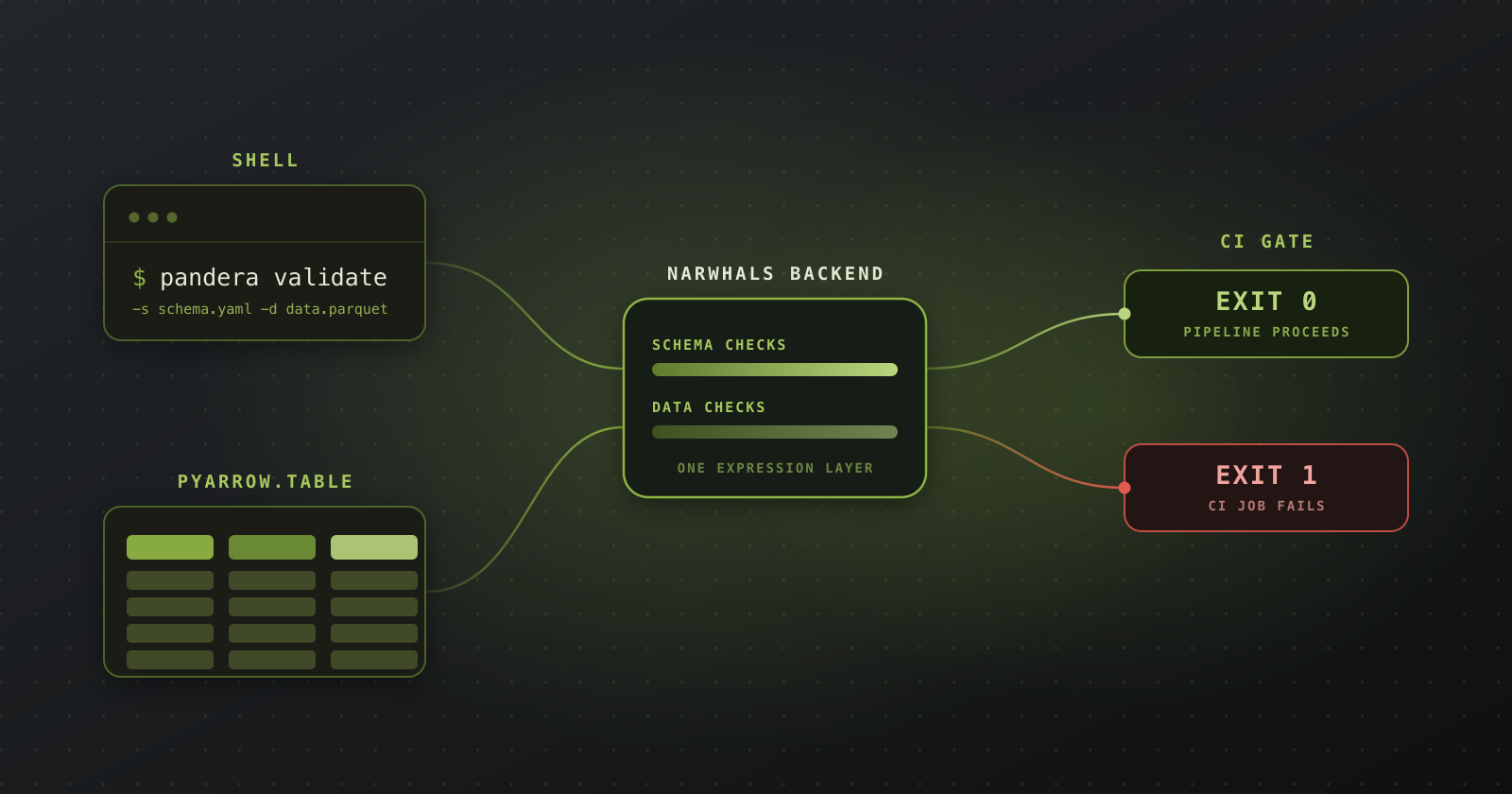
Both of these are built on the unified Narwhals backend that shipped in 0.32: once validation logic is written once against a portable expression layer, pointing new frontends at it gets a lot easier.
The Pandera CLI: validation as a shell command
Install it with the `cli` extra (it's built on Typer):
pip install 'pandera[cli,io]'
You'll also want the `pandera[io]` extra for YAML schema support, plus whichever dataframe library your schema targets. The CLI works with Pandera's serialized schema format — the same YAML/JSON you get from `schema.to_yaml()` — and exposes three commands.
pandera validate
The workhorse. Point it at a schema and a data file:
pandera validate --schema schema.yaml --data data.csv
On success you get a summary of the schema- and data-level checks that ran (rendered as Rich tables if you have Rich installed) and a zero exit code. On failure you get a breakdown of which checks passed and failed, with details — and a non-zero exit code. That last part is the point: it makes Pandera a drop-in CI gate.
No wrapper script, no `python -c` incantation. The job fails when the data does.
Serialized schemas can carry a top-level api field (pandas, polars, ibis, pyspark.sql, and friends) that tells the CLI which dataframe API to validate with; it defaults to pandas when absent. You can also override it at the command line:
The `--backend narwhals` option runs validation through the unified Narwhals engine, and the report tells you which backend actually ran (Backend: `narwhals` vs. Backend: `pandas`), so there's no guessing about which code path checked your data.
pandera infer
Bootstrapping a schema from scratch is the tedious part of adopting any validation library. `infer` reads a data file and writes a schema — as YAML, JSON, or a runnable Python module:
That last form is a nice on-ramp: run it once against representative data, get a `DataFrameModel` class you can check into your repo, then tighten the generated constraints by hand. Inference is a starting point, not a finished schema — but it beats transcribing forty column names.
pandera generate
The inverse of validate: produce synthetic data from a schema, using Pandera's hypothesis-backed strategies (requires `pandera[strategies]`):
This currently supports pandas DataFrame schemas and xarray DataArray/Dataset schemas, and it's handy anywhere you need schema-conformant fixtures — seeding a dev environment, generating test data in CI, or handing a downstream team example files before the real data exists.
The three commands compose into a workflow that never touches a Python file: `infer` a schema from known-good data, commit it, `validate` every future drop against it in CI, and `generate` fixtures for tests along the way.
Native PyArrow table validation
Arrow is the interchange format of the modern data stack — it's what crosses the boundary between DuckDB and pandas, between Polars and your feature store, between a Flight server and its clients. A pyarrow.Table already carries its own schema, but that schema tells you types, not truths: it knows price is an int64, not that a price should be positive. Pandera 0.33.0 closes that gap by validating pyarrow.Table objects directly:
pip install 'pandera[pyarrow]'
The API is the same one you already know, imported from `pandera.pyarrow`:
`validate()` returns the `pyarrow.Table` itself, so it slots into a pipeline without any conversion. Class-based `DataFrameModel`s and the `@pa.check_types` decorator work too:
Dtypes can be declared as native PyArrow types (`pyarrow.int64()`), Python builtins (`int`), or string aliases (`"int64"`) — they all resolve to the same thing — and parametrized types like `pyarrow.timestamp("us")`, `pyarrow.decimal128(10, 2)`, and `pyarrow.list_(pyarrow.int32()`) are supported. Custom checks get a PyArrowData container holding the native table and the column key, so you can drop down to pyarrow.compute:
Under the hood, PyArrow validation runs on the Narwhals backend, which installs automatically with the pyarrow extra. Because an Arrow table is fully materialized (unlike a lazy Polars or Ibis frame), both schema-level and data-level checks run by default; set `PANDERA_VALIDATION_DEPTH=SCHEMA_ONLY` if you only want the cheap structural checks.
There are two limitations to be addressed in the future: `coerce=True` is not yet implemented for PyArrow (you get a `SchemaWarning` and a `WRONG_DATATYPE` error instead of a silent cast), and data synthesis strategies aren't available yet — same as the Polars and Ibis backends.
Conclusion
Pandera 0.33 pushes validation to two new surfaces: the shell, where pandera validate turns any serialized schema into a CI gate with an exit code, and Arrow, where the same `DataFrameSchema` and `DataFrameModel` APIs now run directly against `pyarrow.Table` — the format your data is probably already in when it crosses a system boundary. Both are dividends of the unified Narwhals backend: write the validation engine once, and new frontends get cheap.
Install it with `pip install -U 'pandera[cli,pyarrow]'`, and see the CLI guide and PyArrow guide for the full reference. If you hit an edge, open an issue.