AI engineering tip of the week: Run Code in Ephemeral Containers with Flyte Sandbox
Sometimes you need to run a chunk of code in a clean, isolated environment. Maybe it's code an LLM just wrote, a batch of candidate solutions you're scoring for an RL run, or a quick data transformation that needs packages your main image doesn't have. You don't want to build a full task for it. You just want to run some code in a box and get the result back.
`flyte.sandbox.create()` does exactly that. It spins up an ephemeral container, runs your code, and returns typed outputs. The container is built on demand from the packages you declare, executed once, then thrown away.
Auto-IO mode: the simplest path
Provide Python code as a string. Flyte auto-wires your inputs as variables and captures your outputs. No argparse, no file I/O boilerplate.
Call it with `.run()` from inside a task. Declare `sandbox_environment` as a dependency so the sandbox runtime gets deployed alongside your code:
That's it. Flyte builds an image with numpy, injects `values` as a variable, runs the code, and reads `mean` and `std` back out. Declared outputs come back as a tuple, in the order you declared them. No Dockerfile. No `/var/outputs` wiring.
`.run()` needs a run context, so call it from inside a task rather than at module level. A bare top-level `await stats.run.aio(...)` raises `RuntimeUserError`.
Verbatim mode: full control
Auto-IO is the default. Set `auto_io=False` to manage I/O yourself, and your script reads from `/var/inputs/` and writes to `/var/outputs/` directly:
Verbatim mode is useful when you're porting an existing script that already handles file paths.
Command mode: run anything
Skip Python entirely and run a shell command:
This works for any tool that reads files and writes results. Linters, formatters, compilers, test runners.
Every run starts clean
The sandbox is stateless. Each invocation gets a fresh container, so no filesystem changes, environment variables, or side effects carry over from the last run:
`seen` is `False` every run. Whatever the code wrote last time is gone.
Note the `cache="disable"`. Caching is on by default, so without it the second call returns the cached result instead of starting a new container, and you can't tell the two apart.
Let an agent write the code
The obvious pairing: an LLM writes Python, the sandbox runs it. `create(code=...)` already does that, since `code` is just a string and nothing says you have to be the one who wrote it.
`orchestrator_from_str` goes further. It hands the generated code a set of your real tasks to call:
The last expression becomes the return value. Everything in `tasks=` is callable by name inside the sandbox, so the model writes a few lines of orchestration instead of emitting one tool call at a time and waiting for you to round-trip each result. Your tasks keep their own images, resources, and retries.
Reward signals for RL training
If you're training a coding model with GRPO or anything else that needs verifiable rewards, the reward is code execution. You sample a group of candidate solutions, run each one against tests, and the pass rate becomes the signal.
That execution has to happen somewhere that isn't your training process. A sandbox per candidate gives you that, and the group fans out in parallel:
Two details matter here. `timeout` stops a generated infinite loop from stalling a training step, and the default `cache="auto"` means identical candidates, which you will get plenty of, are scored once instead of every time they reappear.
Configuring the sandbox
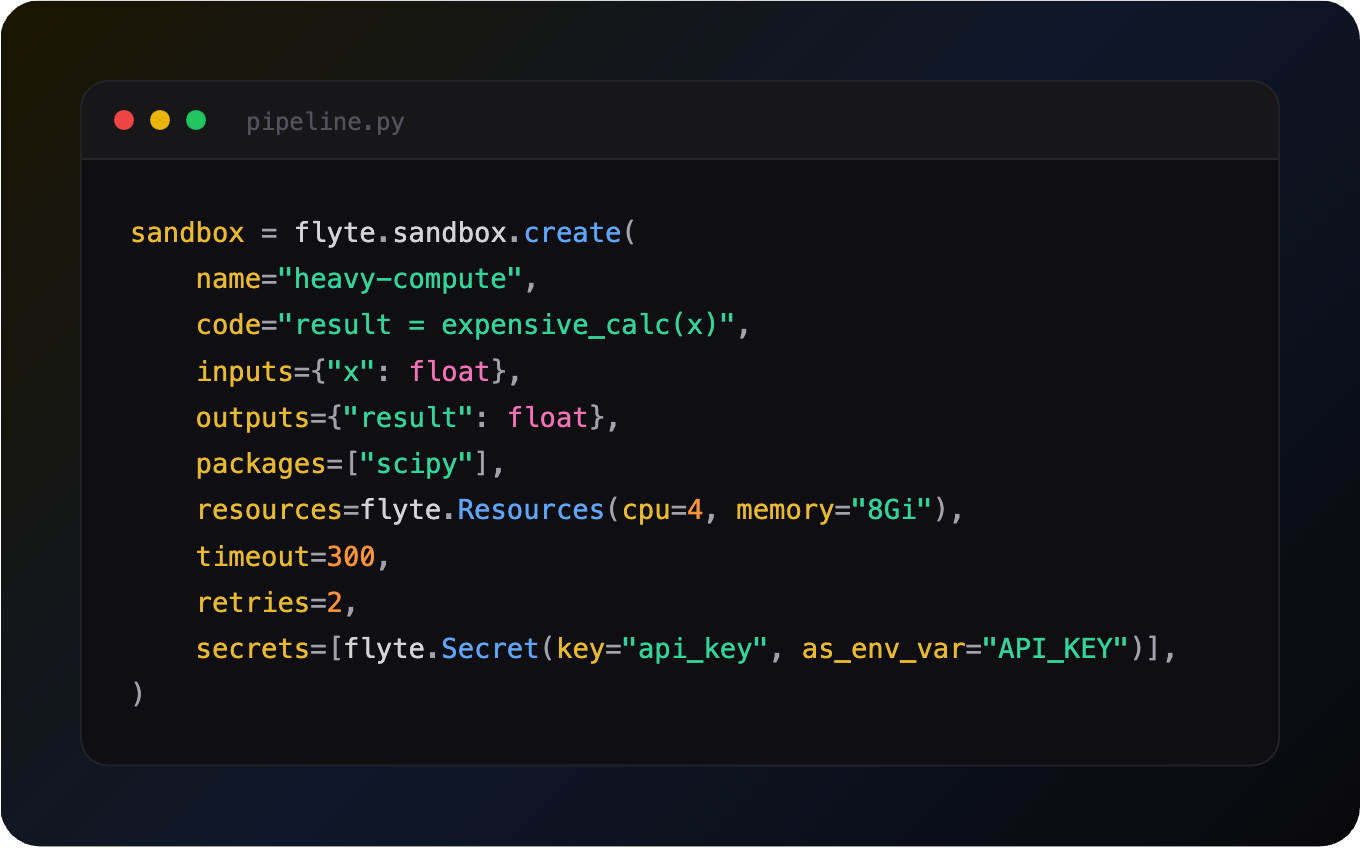
You can set resources, retries, timeouts, secrets, environment variables, and caching:
`create()` also takes `system_packages` for apt installs, `additional_commands` for extra image build steps, `env_vars`, and `image` if you'd rather supply your own base image than have one built from `packages`.
When to use code sandbox
- AI-generated code: Run LLM-generated scripts in a container that can't touch your task's filesystem
- Code-mode agents: Let a model write orchestration that calls your real tasks, instead of one tool call at a time. You should look at Workflow sandbox built on Monty for this.
- RL training: Execute candidate solutions against tests to produce verifiable reward signals
- Quick prototyping: Test a snippet with different packages without rebuilding your image
- Data transformations: One-off ETL scripts that don't justify a full task definition
- Multi-language tools: Command mode runs any CLI tool, not just Python
Full sandbox docs: https://www.union.ai/docs/v2/flyte/user-guide/agents/sandboxing/
See what's happening in the Flyte Community:
Latest from the blog
- Inside Union, the Durable AI Runtime for Flyte 2.0 - Read on Union
- Durable Execution for Any AI Agent Framework - Read on Union
- A Modern Alternative to Slurm for ML Workloads - Read on Union.ai
- Anatomy of a Durable Run - Read on Union.ai
- Flyte 2 Is Generally Available: The Durable, Open-Source AI Runtime - Read on Union.ai
- Why Untrusted Kernel Evaluation Needs Process Isolation (and How We Built It) - Read on Union
Recent talks & recordings
- Flyte 2: The Durable Runtime Built for AI - Watch on YouTube
- When the Pipeline Breaks: Building ML Infrastructure for Biotech R&D | Session 1 - Watch on YouTube
- Building Code Mode Agents - Watch on YouTube
- LLM fine-tuning with GRPO - Watch on YouTube
- LLM fine-tuning with LoRA & QLoRA - Watch on YouTube
Upcoming events
- more events will be posted soon, subscribe to the luma calendar: https://luma.com/unionai
Releases & updates
- Flyte 2 Is Generally Available: The Durable, Open-Source AI Runtime - Read on Union.ai
<div class="button-group is-center"><a class="button" target="_blank" rel="noopener noreferrer" href="https://www.union.ai/docs/v2/flyte/user-guide/run-modes/running-devbox/">Download Devbox</a></div>
From the community
- World Models with V-JEPA 2: prediction in representation space - RSVP on Luma
- AI Book Club: Vision Language Models (VLMs) - RSVP on Luma
That's all for this week! - Sage Elliott