AI engineering tip of the week: Self-Healing Agents and Pipelines: Adjust infra at runtime with .override()
You've defined a task with 4GB of memory. But sometimes you need to run it on a larger dataset that needs 32GB. Or you want to disable caching for a one-off debug run. Or you need to give a specific invocation a custom display name.
The .override() method lets you change task configuration at the call site without touching the task definition. Same task, different settings, one line of code.
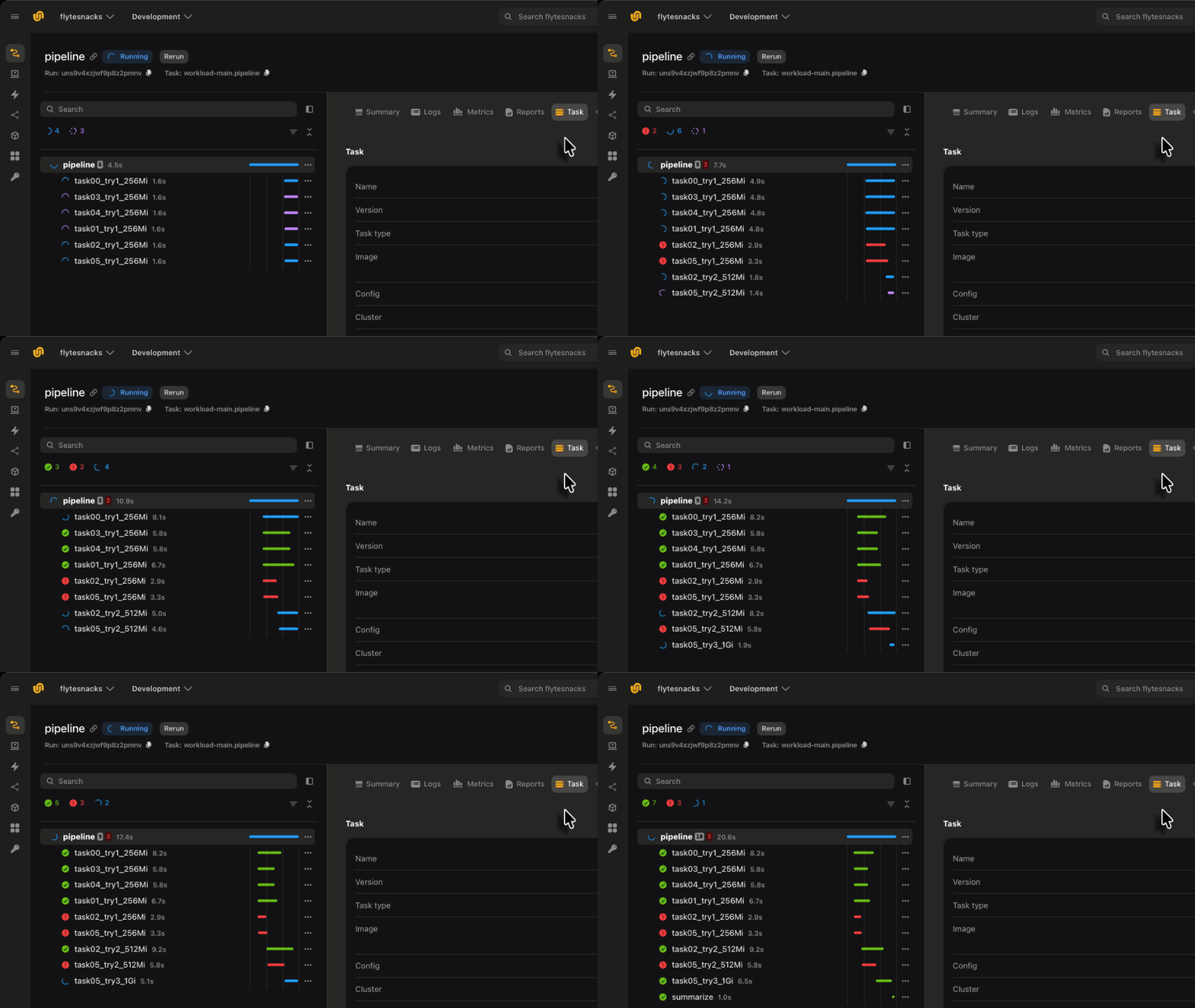
You can see in the example image above we override both the memory resources and task name as the pipeline self-heals from OOM errors.
Override resources
The task code stays the same. Only the infrastructure changes.
Auto-recover from OOM
This is one of the most practical patterns: catch an OOM error and retry with more memory.
Progressive resource scaling
For unpredictable workloads, try multiple resource levels:
Override retries and timeouts
Custom display names for parallel runs
When you fan out the same task many times, `.override(short_name=...)` makes each invocation identifiable in the Flyte UI:
Instead of seeing "train_model" five times in the UI, you see "train-bs-4", "train-bs-8", "train-bs-16", etc.
Override cache behavior
Disable caching for a specific call without changing the task definition:
What you can override
- resources: CPU, memory, GPU, disk, shared memory
- retries: Number of retry attempts
- timeout: Max runtime and queue time
- short_name: Display name in the Flyte UI
- cache: Cache behavior ("auto", "disable", or a Cache object)
- env_vars: Environment variables
- secrets: Secret injection
Why this matters
`.override()` means you write one task and adapt it to different situations at the call site. No duplicate task definitions, no configuration flags, no if/else inside the task. The task stays clean. The caller decides the infrastructure.
The flyte errors combined with override also lets you to provide infrastructure as context allowing you to build duerable self-healing agentic systems.
Full override docs: https://www.union.ai/docs/v2/flyte/user-guide/tasks/task-configuration/resources/
See what's happening in the Flyte Community:
Latest from the blog
- Durable Execution for Any AI Agent Framework - Read on Union
- A Modern Alternative to Slurm for ML Workloads - Read on Union.ai
- Anatomy of a Durable Run - Read on Union.ai
- Flyte 2 Is Generally Available: The Durable, Open-Source AI Runtime - Read on Union.ai
- Why Untrusted Kernel Evaluation Needs Process Isolation (and How We Built It) - Read on Union
- A Memory Store Built on Flyte and Cognee - Read on Union.ai
Recent talks & recordings
- Flyte 2: The Durable Runtime Built for AI - Watch on YouTube
- When the Pipeline Breaks: Building ML Infrastructure for Biotech R&D | Session 1 - Watch on YouTube
- Building Code Mode Agents - Watch on YouTube
- LLM fine-tuning with GRPO - Watch on YouTube
- LLM fine-tuning with LoRA & QLoRA - Watch on YouTube
Upcoming events
- more events will be posted soon, subscribe to the luma calendar: https://luma.com/unionai
Releases & updates
- Flyte 2 Is Generally Available: The Durable, Open-Source AI Runtime - Read on Union.ai
<div class="button-group is-center"><a class="button" target="_blank" rel="noopener noreferrer" href="https://www.union.ai/docs/v2/flyte/user-guide/run-modes/running-devbox/">Download Devbox</a></div>
From the community
- Sebastian Raschka | Build a Reasoning Model (From Scratch) - Author Discussion - RSVP on Luma
- World Models with DreamerV3 - AI Build & Learn - RSVP on Luma
That's all for this week! - Sage Elliott