AI engineering tip of the week: Serve an LLM on Flyte That Scales to zero when Idle
Self-hosting a model usually means picking up a whole second stack. An inference server, a container image that agrees with your CUDA version, an autoscaler, an ingress, and a bill that runs all night whether anyone sends a request or not.
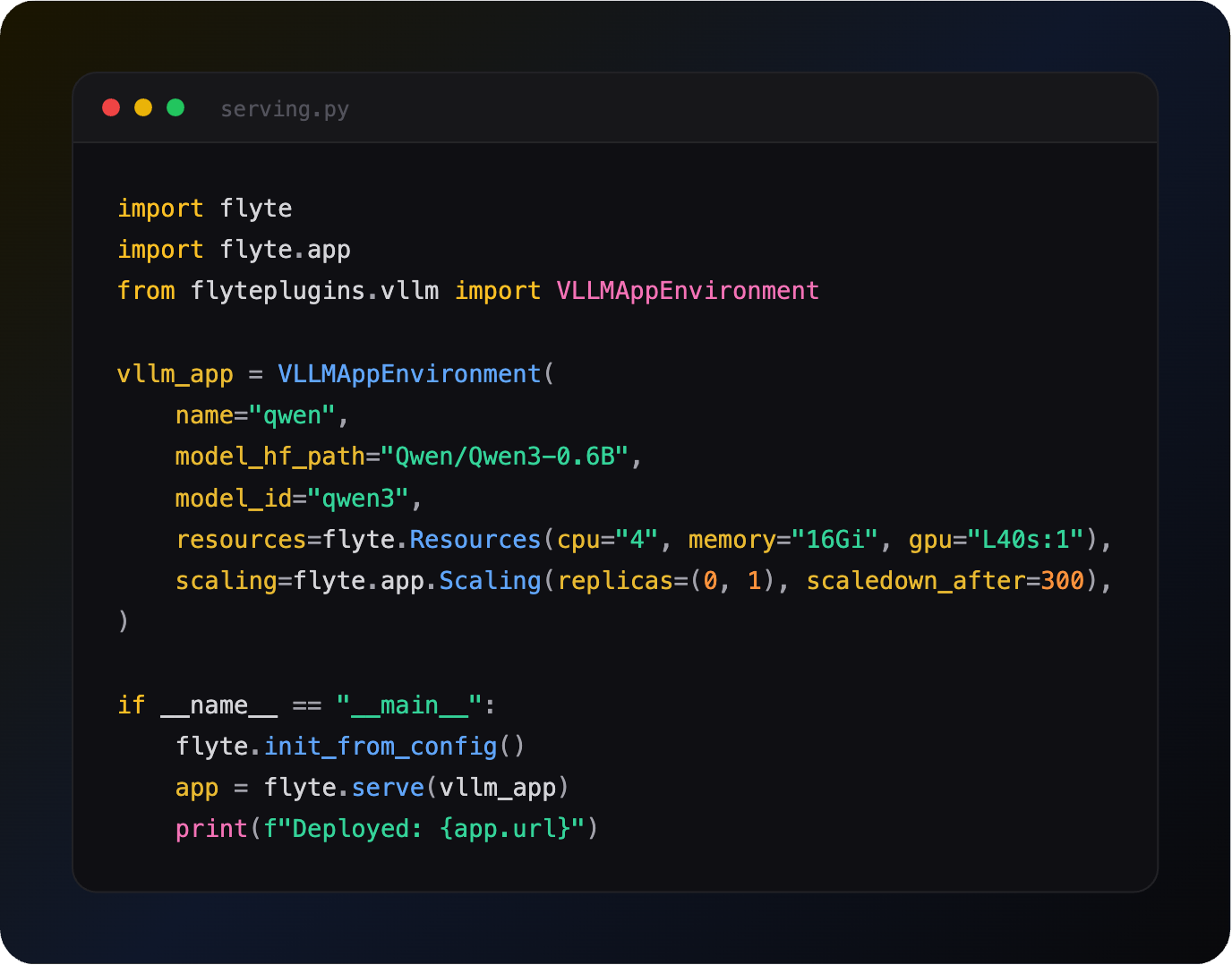
In Flyte, serving a model is an app environment and a `flyte.serve()` call. Same shape as serving a FastAPI endpoint, same shape as serving a dashboard. You swap the environment class to swap the engine.
If you're already using Flyte to build your durable AI pipelines, than the code will look familiar to you. Resources, container image, and scaling is all defined in an easy to use SDK.
Example: Serve a model from HuggingFace
That gets you an OpenAI-compatible endpoint. Point any OpenAI client at `app.url` and it works.
Install the Flyte vllm plugin first:
Swap the engine, keep the code
Prefer serving LLMs on SGLang instead of vLLM? Change the import and the class name. Everything else stays put:
There's also `LlamaCppAppEnvironment` for GGUF weights on smaller hardware, and an Ollama integration. Same constructor arguments, same `flyte.serve()`.
`VLLMAppEnvironment`, `SGLangAppEnvironment`, and `FastAPIAppEnvironment` all subclass `flyte.app.AppEnvironment`, so the engine is a detail, not a new framework to learn.
Scale to zero so idle costs nothing
The scaling argument makes it incredibly easy to scale to zero when your model is idle.
This scales to Zero replicas when nothing is calling the model after 300 seconds (5 minutes), and back up to one when something does. This makes it easy to ensure GPU endpoint you use during business hours stops billing you overnight when idle.
You can adjust this pattern to fit your usage needs, such as always having one instance on and scaling to more when needed.
You can scale on a metric too, with `Scaling.Concurrency(val)` for concurrent requests per replica or `Scaling.RequestRate(val)` for requests per second.
Cut the cold start
Scale-to-zero trades idle cost for startup time, so it may be worth optimizing startup time directly as well.
`stream_model=True` streams weights from object storage straight to GPU memory instead of downloading the whole model to disk first. Less disk, faster start.
Prefetching handles the rest. Pull the model into your object store once, ahead of any deploy:
Then point the app at what you prefetched instead of at HuggingFace. The weights are versioned in your own storage, downloaded once rather than on every cold start, and can be pre-sharded for multi-GPU tensor parallelism.
You can also read more about how Union cut container cold boot from minutes to seconds.
Serve what your pipeline just produced
`model_path` doesn't have to be a hardcoded bucket path. Have your training task return a `flyte.io.Dir`:
Then point the app at that run rather than copying a path between them:
`RunOutput` resolves at deploy time. `type` is one of `string`, `file`, or `directory`, and you can target a specific run by name or the latest run of a named task:
For apps without a dedicated `model_path`, the general form is a parameter with a mount point, which works for any `AppEnvironment`:
The weights land at the mount path and your startup hook loads them from there. Same idea either way: the app depends on a run, not on a path someone pasted.
The same pattern works with `flyte.prefetch.hf_model()`, which pulls a HuggingFace model into your own storage as a run you can point at.
If you're on Union, `ArtifactValue` works here too, and artifacts add versioning and lineage on top of plain run outputs. Artifacts are a Union feature so on OSS the `RunOutput` route above is the one to use. Union's artifact docs cover the difference: https://www.union.ai/docs/v2/union/user-guide/artifacts/artifacts-in-apps/
Serve apps too, not just models
The same machinery serves ordinary applications. `FastAPIAppEnvironment` puts an API in front of a scikit-learn model, Streamlit and Gradio give stakeholders something to click, and all of them get the same scaling behavior.
The pipeline that trained the weights, the endpoint that serves them, and the dashboard on top all live in one system, with one deployment story.
Why this matters
- One API: An app environment plus `flyte.serve()`, whether it's vLLM, SGLang, llama.cpp, or FastAPI
- No idle spend: Makes Scaling to zero between requests and scaling up on demand easy
- Faster starts: Stream weights to GPU, or prefetch them into your own storage
- OpenAI-compatible: Existing clients work against the deployed URL
- Wired to your pipelines: Point an app at a run's output instead of copying bucket paths around
- Same place as your pipelines: Train and serve without a second platform
Full serving docs: https://www.union.ai/docs/v2/flyte/user-guide/apps/
See what's happening in the Flyte Community:
Latest from the blog
- Inside Union: The Replay Log That Makes Flyte 2.0 Durable - Read on Union
- We Ran Multi-Node GRPO on 8 GPUs and the Trainer Cost Us Nothing - Read on Union
- Inside Union, the Durable AI Runtime for Flyte 2.0 - Read on Union
- Durable Execution for Any AI Agent Framework - Read on Union
- A Modern Alternative to Slurm for ML Workloads - Read on Union.ai
- Anatomy of a Durable Run - Read on Union.ai
Recent talks & recordings
- Flyte 2: The Durable Runtime Built for AI - Watch on YouTube
- When the Pipeline Breaks: Building ML Infrastructure for Biotech R&D | Session 1 - Watch on YouTube
- Building Code Mode Agents - Watch on YouTube
- LLM fine-tuning with GRPO - Watch on YouTube
- LLM fine-tuning with LoRA & QLoRA - Watch on YouTube
Upcoming events
- Union.ai Product Update: AI Infrastructure Made Easier | Sep 30 - RSVP on Luma
- [Melbourne] Fine-tuning open models with agents: from eval to deployment | Sep 30 - RSVP on Luma
- [SF] Own Your AI: Build Your First Model Factory - Hack Night | Nov 3 - RSVP on Luma
Releases & updates
- Flyte 2 Is Generally Available: The Durable, Open-Source AI Runtime - Read on Union.ai
<div class="button-group is-center"><a class="button" target="_blank" rel="noopener noreferrer" href="https://www.union.ai/docs/v2/flyte/user-guide/run-modes/running-devbox/">Download Devbox</a></div>
From the community
- AI Book Club: Vision Language Models (VLMs) - RSVP on Luma
That's all for this week! - Sage Elliott