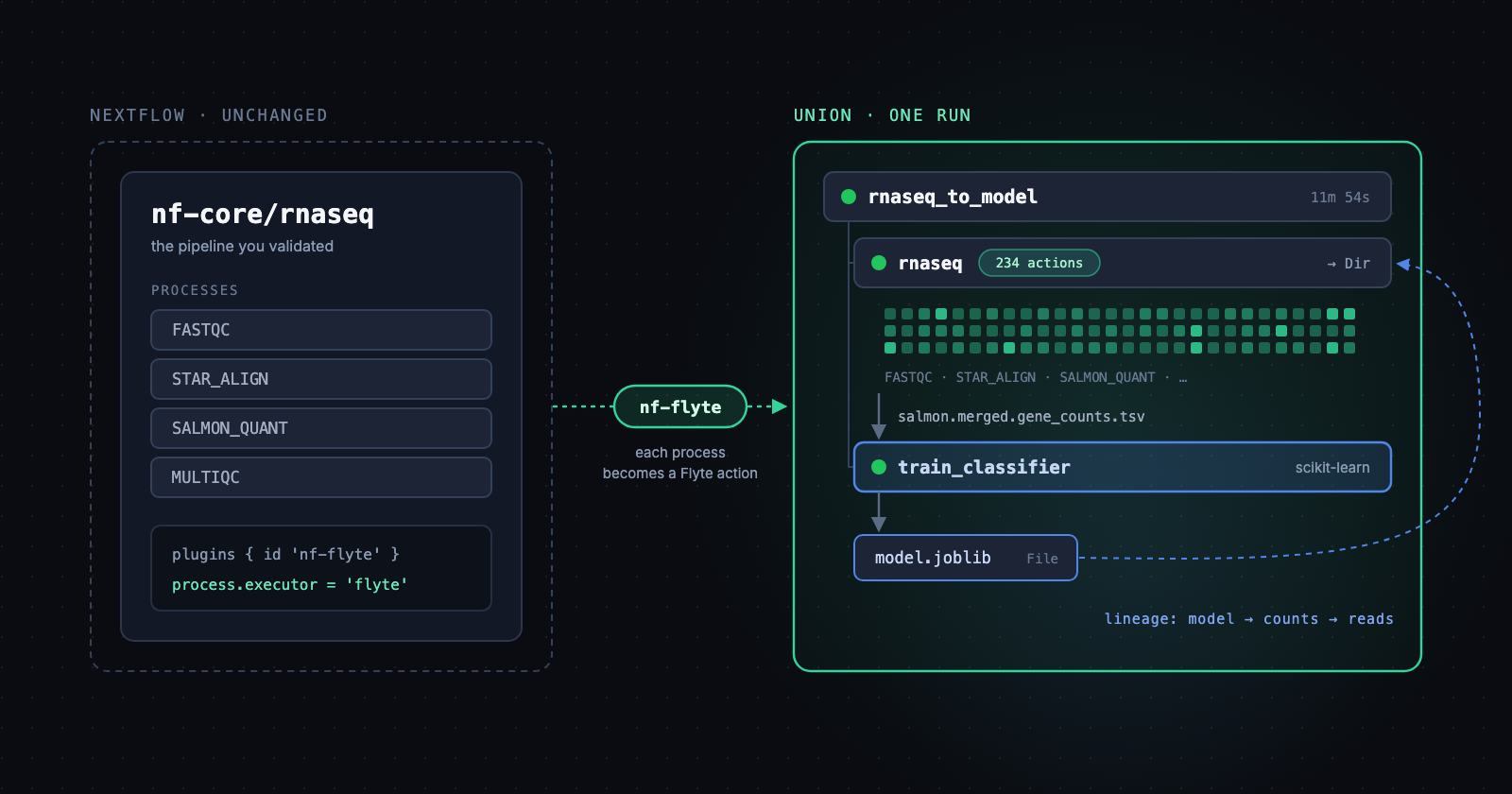
nf-flyte makes Union a Nextflow executor. Your pipelines run unchanged, each process becomes a Flyte action, and the results feed straight into the Python and ML tasks you already run on Union.
If you do bioinformatics, you probably run Nextflow. Most of what you run likely comes from nf-core, the community collection of pipelines that academia and industry have trusted and validated for years. Some of those pipelines sit inside clinically validated workflows that took years to qualify. Nobody is going to rewrite them in a different orchestrator, and nobody should have to.
Teams in that position keep telling us the same thing. The ML side of the house runs on Union, and the bioinformatics pipelines run somewhere else: a Batch queue, a Slurm cluster, a Kubernetes namespace, plus whatever platform sits on top to provide logs and monitoring. That means two platforms, two sets of credentials and two places to look when something breaks. Getting a pipeline's output into a training job also means a handoff, usually a bucket path pasted into a config file.
Now you can run them in one place. nf-flyte is a Nextflow executor plugin for Flyte v2, published in the Nextflow plugin registry. Point a pipeline at it and every Nextflow process runs as a Flyte action on Union. You don't change a line of the pipeline.
Nextflow with Flyte as the executor
Nextflow describes the pipeline but doesn't schedule compute itself. It hands every process to an executor: `local`, `slurm`, `awsbatch`, `k8s` and so on. That pluggable layer is what makes this possible. nf-flyte adds a `flyte` executor, so the Nextflow head still parses the pipeline, resolves channels and decides what runs next. Each task it submits becomes a Flyte action under one Flyte run.
Here's how one task runs:
- The head renders Nextflow's usual task wrapper (`.command.run`) and submits a container action with the process's `container`, `cpus`, `memory`, `disk`, `accelerator` and `time` directives.
- Flyte's copilot downloads the task's input files into the pod. The wrapper runs the process, and copilot uploads the outputs and the `.command.*` files.
- The head copies the results back into the Nextflow work dir, where Nextflow collects them as it always does. On failure, the exit code, stdout and stderr come back too, so `errorStrategy` and exit-code-based retry rules keep working. That includes a 137 from an OOM-killed pod.
The process containers need `bash` and nothing else. Flyte moves the data, so your biocontainers and Wave images don't need the Flyte SDK or a cloud CLI installed.
A few design choices matter in practice:
- Nextflow stays in charge of retries and `-resume`. Flyte retries are turned off for task actions, so `errorStrategy` behaves the way your pipeline expects.
- Flyte caches task results across runs. Each action's cache key comes from the process script, container, environment, `bin` scripts and inputs, but not the Nextflow session. A task that finished in one run is reused by the next, even from a fresh launch directory. Failed tasks are never cached.
- Cancellation propagates. Aborting the Flyte run (or pressing Ctrl+C on the head) aborts every running task action.
Run an nf-core pipeline on Union
There are two ways to launch, depending on where you want the Nextflow head to live.
From your laptop or CI: a config change
If you already run `nextflow run`, add the plugin and the executor to a config file:
Nextflow creates the Flyte run, prints its URL and keeps a heartbeat going. The run's root task is named after the pipeline (`nf-core/demo`). If the head goes away (a closed laptop, a killed CI job), the heartbeat stops and Union aborts the remaining tasks instead of leaving them running.
A `plugins` block in a `-c` config replaces the pipeline's own, so repeat the pipeline's plugins with the versions listed in its `nextflow.config`. Leave them out and Nextflow picks the newest release of each, and nf-core pipelines can fail with `Missing process or function paramsSummaryLog`.
nf-flyte itself is unpinned above, so Nextflow uses its newest release. For a pipeline you've validated, pin it (`id 'nf-flyte@0.2.1'`), as you do the pipeline's own plugins.
From a Flyte task: the head runs on Union too
A Nextflow head is long-lived, so in practice it ends up in a `tmux` session on a box somebody has to keep alive. With flyteplugins-nextflow the head becomes an ordinary Flyte task that you can launch, retry, schedule, trigger on new data, and cancel like any other:
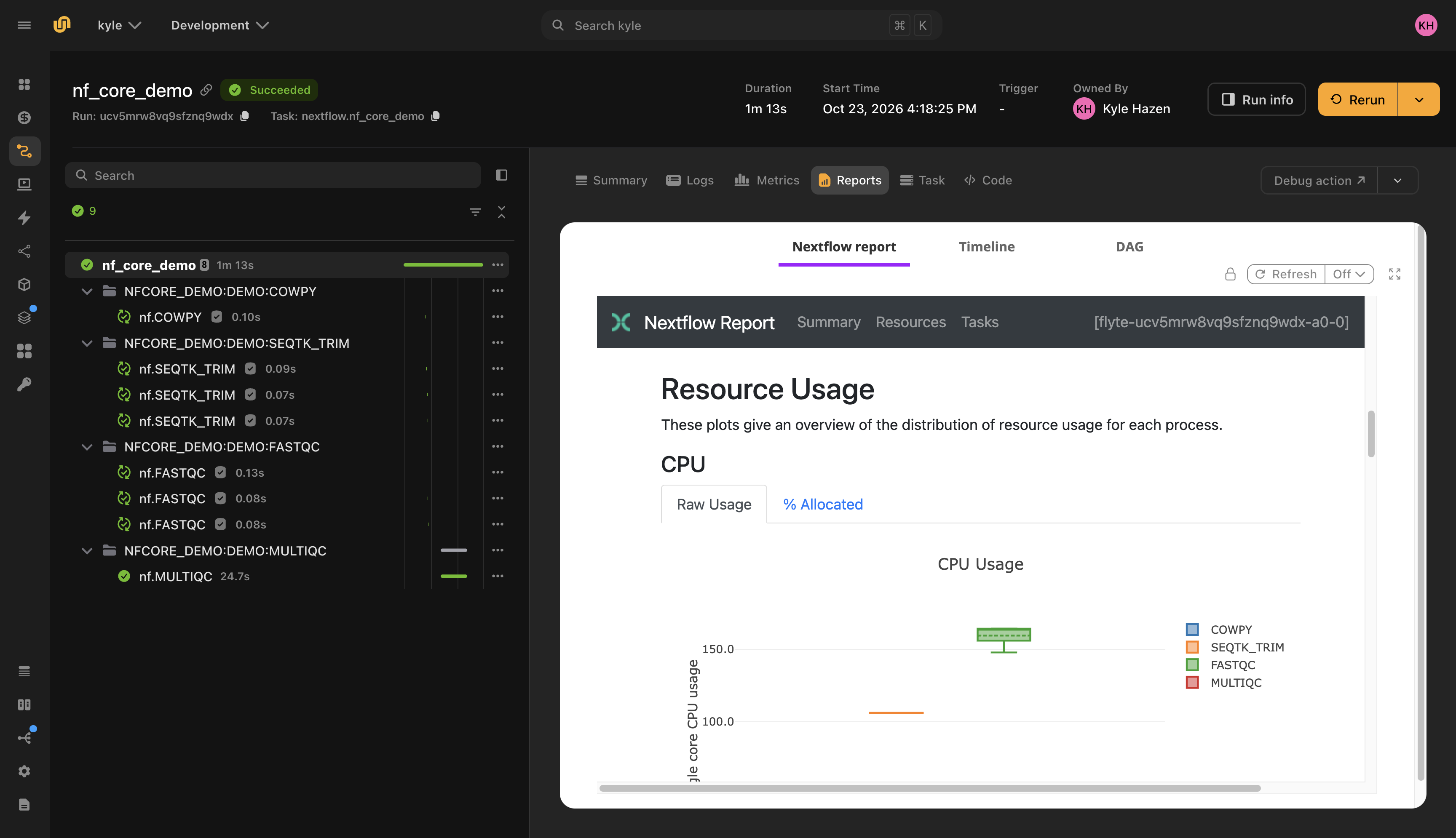
`run_nextflow` writes the config, wires the Nextflow tasks in as children of the calling action, and puts the work dir under the task's own storage, so there's no bucket to set up. A retried attempt resumes automatically from the same work dir. To resume across runs, pass a fixed `work_dir` and `resume=True`. With `report=True`, Nextflow's execution report, timeline and DAG show up as tabs on the task, even when the pipeline fails. The `outdir` comes back as a typed `Dir`, which matters in the next section.
nf-core in, model out
Running Nextflow on Union consolidates platforms. The bigger change is that the pipeline's output is now a typed value inside a Flyte run, so the next step doesn't have to be another pipeline.
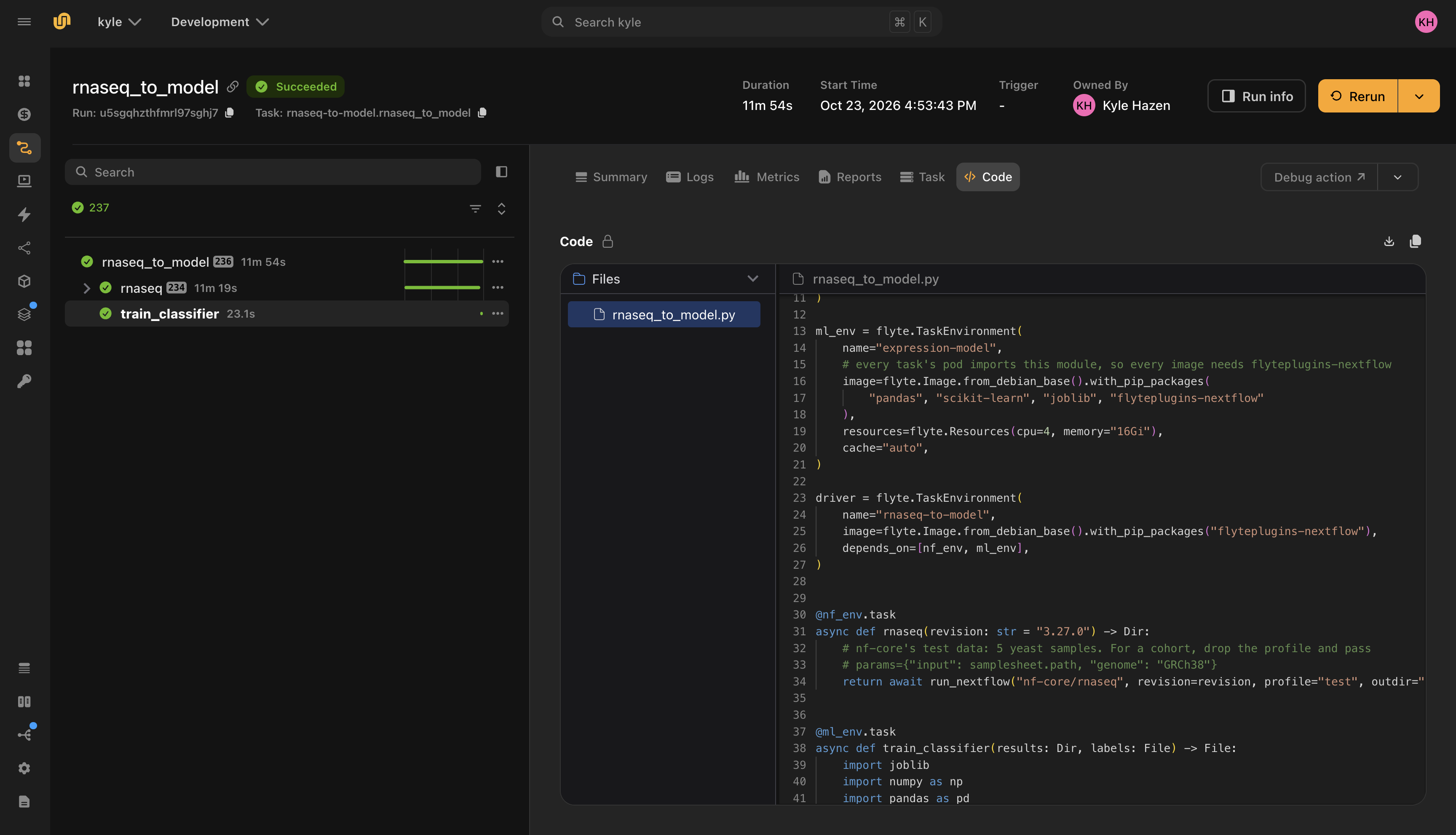
Here's the shape most of our genomics users actually have: run `nf-core/rnaseq` on a cohort, then train or evaluate a model on the gene counts it produces. On Union that's a single run:
Every Nextflow process and the training task show up as actions in one run tree. Here's what you get from that without writing any extra code:
- Lineage from model to reads. The model file traces back through `train_classifier` to the exact `Dir` the rnaseq run produced, then to the pipeline revision and parameters that produced it. Each process action underneath shows its inputs and its rendered command.
- Caching at two levels. Change the classifier and rerun: the `rnaseq` task is a cache hit on the same inputs and revision, so only training runs. Change a pipeline parameter and the head reruns, but nf-flyte's per-process cache still reuses every process whose script, container and inputs didn't change.
- Each step sized for its own work. Nextflow processes take their resources from their own directives. The training task asks for what it needs, a GPU included. Process directives like `accelerator` map to Flyte GPUs, and `flyte { queue = 'gpu' }` routes task actions to a specific queue.
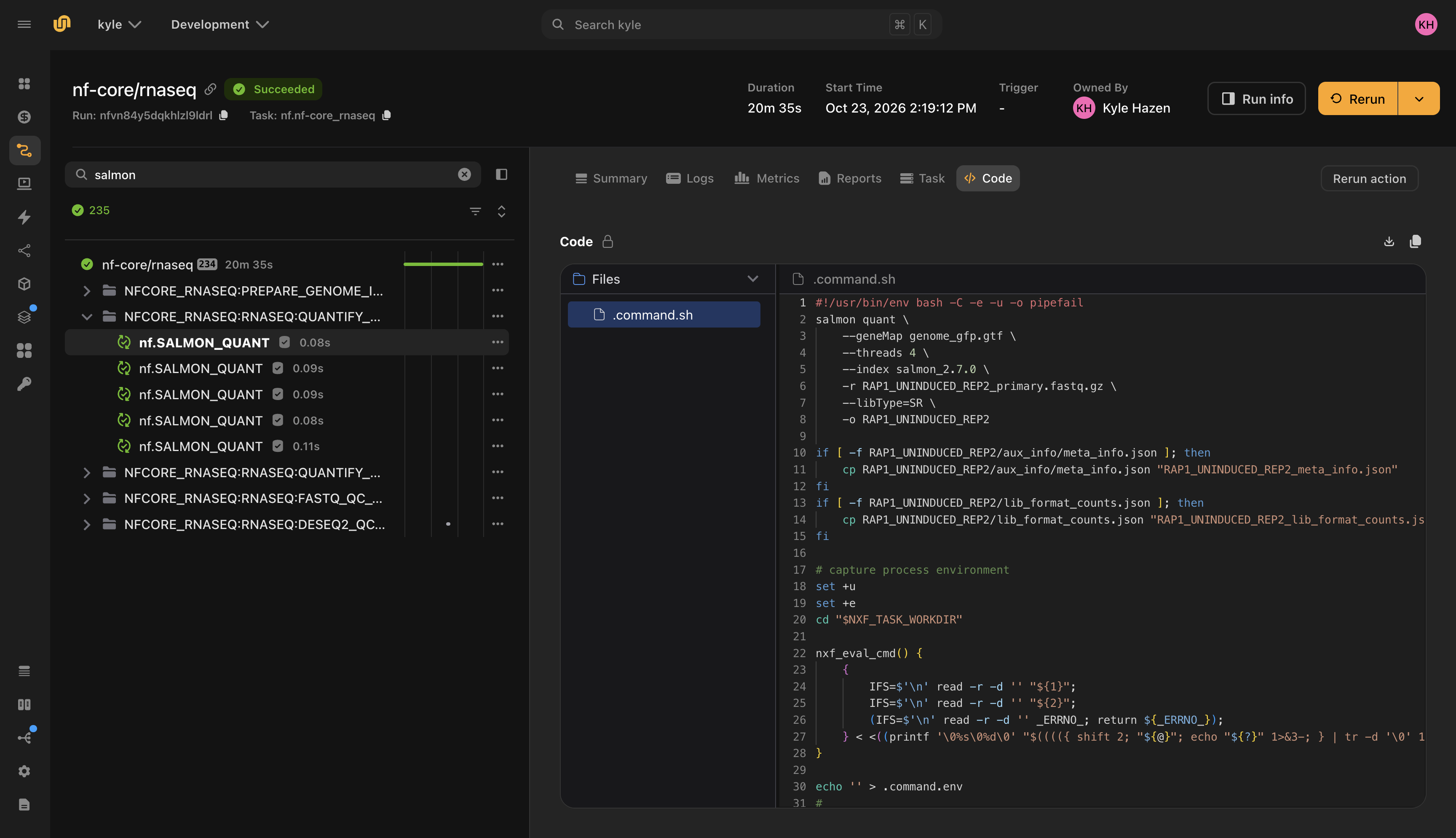
- One place to debug. Each task action's Code tab shows the code that Nextflow rendered for it: the exact command, with the real file names, that ran in that pod. Task inputs and logs sit in the same UI, under the same run, with the same access controls.
The handoff between the bioinformatics pipeline and the ML code used to be an S3 path in a Slack message. Now it's a typed function argument.
Tradeoffs and current limits
This is a new integration, and you should know where its edges are:
- Early releases. We've run several nf-core pipelines end to end and are testing more now. If a pipeline misbehaves, open an issue.
- Nextflow owns retries. Retry policy comes from `errorStrategy` and `maxRetries` in your config, not from Flyte retry settings on the task actions. This keeps validated behaviour intact, but it means Flyte's retry knobs don't apply per process.
- Cross-run resume needs a fixed work dir. Flyte's per-process cache works across runs regardless. Nextflow's own `-resume` needs the same `work_dir` and `resume=True`.
- The work dir must be on object storage Union can read (S3, GCS or Azure). The default under the task's storage always qualifies.
- Versions. You need `flyte` 2.12.0 or later, `flyteplugins-nextflow` 2.12.2 or later, and Nextflow 25.10.0 or later.
- It doesn't make individual processes faster. A STAR alignment takes as long as it takes. What you gain is around the processes: distributed caching across runs, a hosted head, observability and tight integration with steps that come before and after.
Try it
Start with `nf-core/demo` and the `test` profile. It takes a few minutes and shows the whole loop. Then try out a Nextflow pipeline you actually run.
- nf-flyte, with config reference and how a task runs: github.com/unionai/nf-flyte
- `flyteplugins-nextflow` and the `run_nextflow` reference: flyte-sdk/plugins/nextflow
- The Nextflow integration guide in the Union docs
Your pipelines stay the Nextflow pipelines you validated. What changes is that they now run on the same durable platform as everything else, and their outputs feed straight into the next task.